
Form connection
Your Facebook and Instagram lead forms are listed and you choose which ones to connect.
It is not enough for the form to reach your CRM; the ad it came from should reach it too. Otherwise the question "which ad brought sales" has no answer at the end of the month.
At a glance
Plenty of tools move the form into your CRM. The problem is not moving it, but not moving the breakdown:
What sets it apart from Bitrix24's own Facebook connection is writing the breakdown as fields and reporting the sale back to Meta.
Your Facebook and Instagram lead forms are listed and you choose which ones to connect.
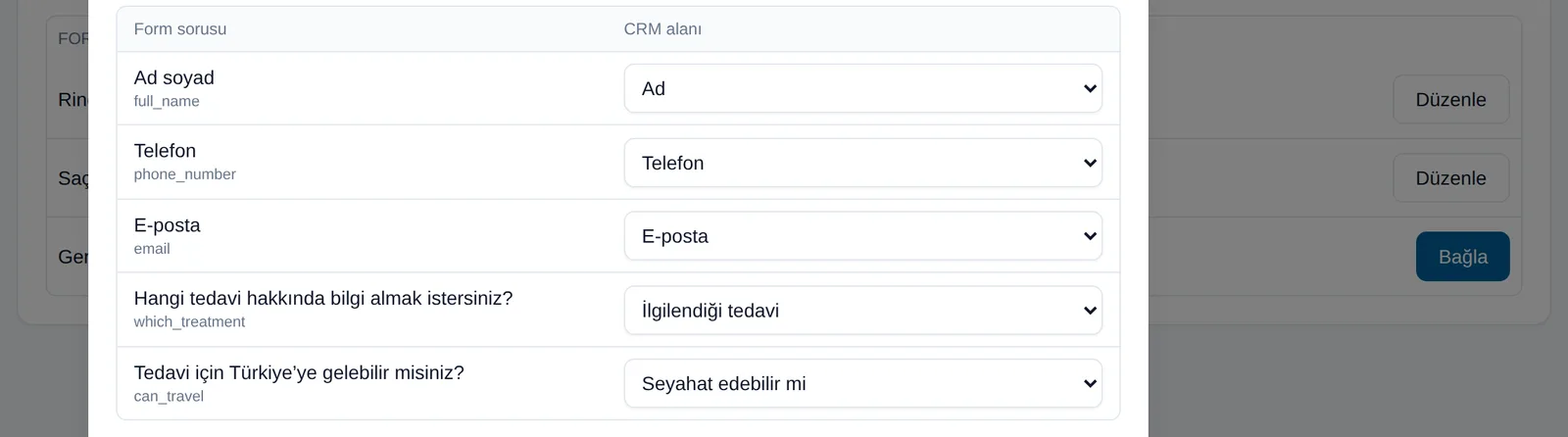
You place a Bitrix24 field next to each form question. Multiple-choice answers land on their match in the Bitrix24 list.
Campaign, ad set and ad name are written as dropdown fields, and UTM fields are filled in as well.
You choose whether a form creates a Lead, a Contact, or a Contact plus Deal.
Owners are set per form; if you pick several people, records are distributed in turn.
The Meta Lead ID is written to the record, so a lead reported twice does not create a second record.
If the campaign name is written to the record as free text you cannot filter, group or report on it; all you have is a readable note. In this integration campaign, ad set and ad name are held as dropdown fields in Bitrix24. When a new ad goes live the list grows on its own. You can then filter "leads from this campaign" in Bitrix24's own CRM lists and see the conversion rate. On the technical side one detail has been handled carefully: Meta's payload carries only IDs and not names; names are resolved from the ad tree and cached, and because the ID stays fixed even when a name changes, past records are not corrupted.

The system does not guess which Bitrix24 field a form question goes to; you map it. That looks like extra work at first but it is a deliberate choice: if it guessed, it would quietly produce wrong data that goes unnoticed for months. By the same logic, leads arriving before the mapping is saved are not written to Bitrix24; they wait. The moment you save the mapping, waiting leads are written retroactively, so no lead is lost. Answers you did not map are not lost either; they are noted on the record timeline.
Because a ready Meta authorization setup is used, you do not have to create your own Meta app and go through App Review; a process that normally takes weeks. In the panel you connect your Facebook account and pick your page; your ad accounts come with the connection and you choose which are in scope. The only condition is that the Facebook account you connect has permission for that ad account and page in Meta Business; without it, forms are not listed.
Bitrix24's built-in connection moves the form into the record; the difference is in the breakdown and the feedback loop.
| Topic | Bitrix24 built-in | Meta Lead Ads integration |
|---|---|---|
| Does the form reach the record? | Yes | Yes, within seconds |
| Campaign / ad set / ad name | Not carried | As dropdown fields |
| UTM fields | Limited | Written to standard UTM fields |
| Field mapping | Fixed | You choose, question by question |
| Owner distribution | One rule | Per form, distributed in turn |
| Duplicate control | Limited | By Meta Lead ID |
| Reporting the sale to Meta | No | Yes (Conversions API) |
| Monthly cost | Included in the Bitrix24 plan | USD 79 per ad account |
How would this work in your process?
In a free 30-minute call we listen to your workflow and map out how this would run in your company.
The critical part is field mapping; a wrong mapping produces broken data that goes unnoticed for months.
We decide together which ad accounts and forms are in scope.
Bitrix24 fields matching the form questions are created where they do not exist.
Each question is mapped to a field, and record type, owner distribution and source value are defined.
A test lead is sent and we check that it lands in the right fields with the breakdown written.
Technical detail and the live demo are on the product's own site.
The official account of field mapping, breakdown fields and technical detail.
flexinbox.ioThe Open Channel flow and setup steps on the Bitrix24 side.
flexinbox.ioA live demo of the real panel with sample data, no sign-up required.
flexinbox.ioThe modules we most often roll out alongside this one; they reinforce each other in the same setup.
Collecting leads is the easy part. Responding quickly, assigning correctly and following up consistently is where deals are won. We build Bitrix24 around those three things.
Clicks and open rates don't prove a campaign worked; closed revenue does. We connect your campaigns to CRM data so every lira spent can be matched against the deals it produced.
You spend real money to be visible on Instagram, yet interest that lands in the DM inbox cools within hours. The official Instagram connection turns every message into a record you can follow.
Rebuilding the same spreadsheet every week costs you hours and, worse, decision quality. We connect your CRM data to live dashboards so the report builds itself while you work.
WhatsApp is the primary channel for customer communication in Turkey, yet in most setups it sits outside the CRM. We connect your team's own number to Bitrix24 Open Channels.
Stop opening a separate app for customers who write on Telegram. Your team's Telegram accounts connect to Bitrix24 and conversations are written to the same customer record.
An assistant that gives the first answer to enquiries arriving out of hours, trained on your own price list. When it does not know, it hands off to the Bitrix24 queue rather than inventing an answer.
Bitrix24's connection moves the form into the record but does not carry campaign, ad set and ad name as fields. This integration writes the breakdown as dropdown values, assigns the owner and source by your rules, and reports the sale back to Meta as a conversion.
Yes. Facebook lead forms and Instagram forms land in the same list, and the platform is kept in a separate field on the record so you can report by platform too.
No. A ready provider authorization is used. All you do is connect your Facebook account in the panel and pick your page and ad accounts. Creating your own app and passing App Review normally takes weeks.
You decide per form: one person or several. If you pick several, records are distributed in turn so the load is shared evenly. You also choose what is written to the source field, per form.
They do not. Without a mapping a lead is not written to Bitrix24; it waits. The moment you save the mapping, waiting leads are written retroactively. This is deliberate: waiting was chosen over guessing and writing to the wrong field.
USD 79 per ad account per month, or USD 790 per year. The number of campaigns, forms and leads makes no difference. Two ad accounts in scope is USD 158. The module is bought separately from your WhatsApp line. Meta does not charge separately for lead forms or conversion reporting; your ad budget is paid to Meta as usual.
Writing forms to the CRM and reporting conversions work with Bitrix24 today. Zoho, HubSpot and GoHighLevel are next; in the meantime you can use those CRMs' own Lead Ads connections.
Book a free intro call and we'll walk through your process and show which settings fit you.