Features

Capture every lead in one stream and lose none

Collecting leads is the easy part. Responding quickly, assigning correctly and following up consistently is where deals are won. We build Bitrix24 around those three things.

At a glance

  • Omnichannel capture
  • Forms without code
  • Assignment rules and SLAs
  • Lead scoring
  • Nurture sequences
THE PROBLEM

Scattered inquiries mean lost revenue

  • Inquiries live in inboxes, WhatsApp threads, social DMs and spreadsheets at the same time.
  • First response takes hours instead of minutes, so warm interest goes cold.
  • Leads land on the wrong rep or on nobody at all, and ownership stays unclear.
  • The same person signs up twice through two channels and gets called twice.
  • Nobody can say with confidence which campaign actually produced revenue.
THE FIX

How the lead flow we build works

We connect your sources, turn every inquiry into a clean CRM record and hand it to the right rep within seconds. Your team spends its time talking, not typing.

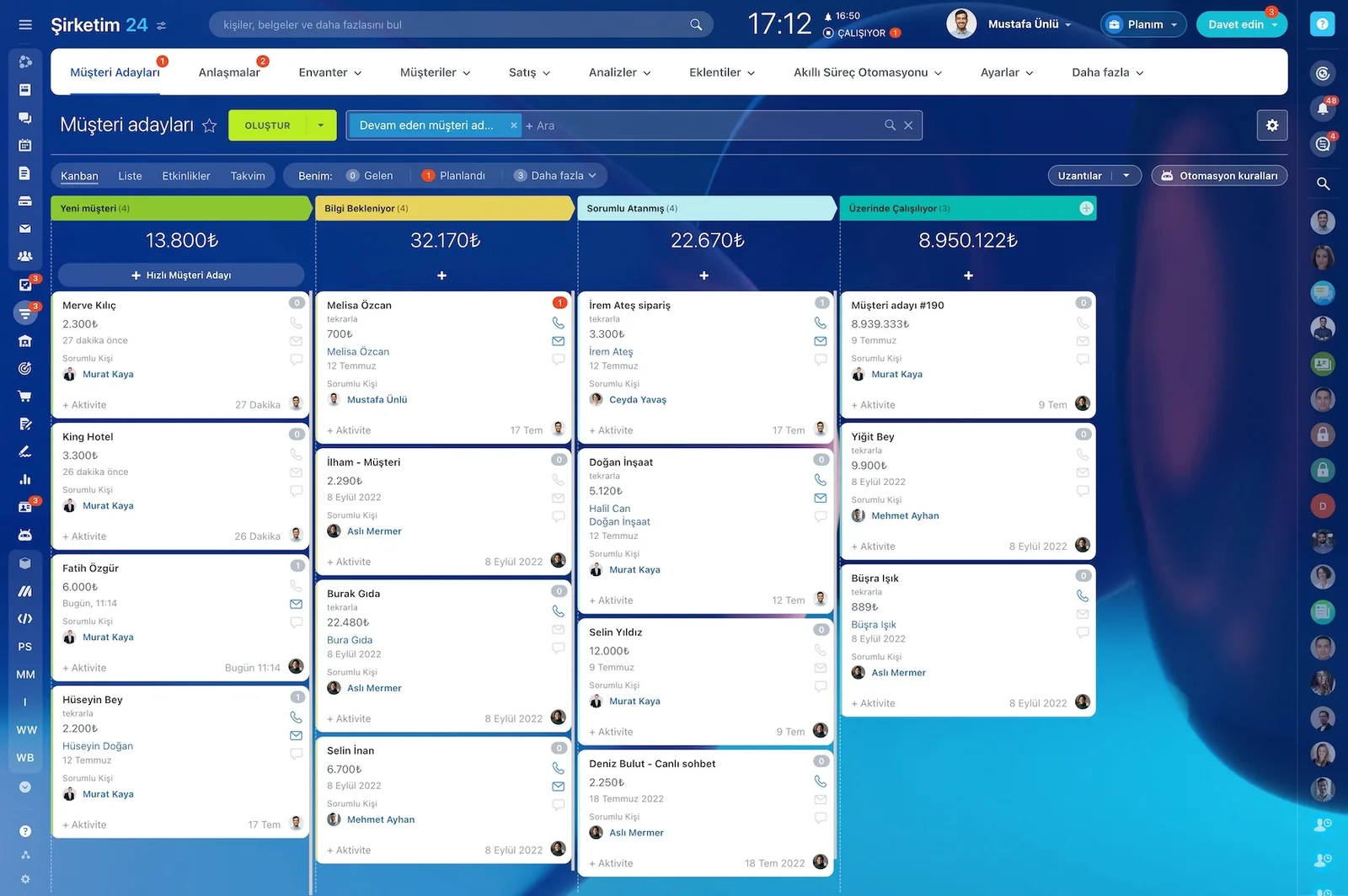
  • Web forms, live chat, WhatsApp, Instagram and Facebook DMs, email and calls feed a single inbox.
  • Inquiries arriving with the same phone or email are merged automatically, so duplicates never pile up.
  • Routing rules based on source, region, product or language put each lead with the right owner.
  • An SLA timer and a task open on first contact; managers are alerted if the clock runs out.
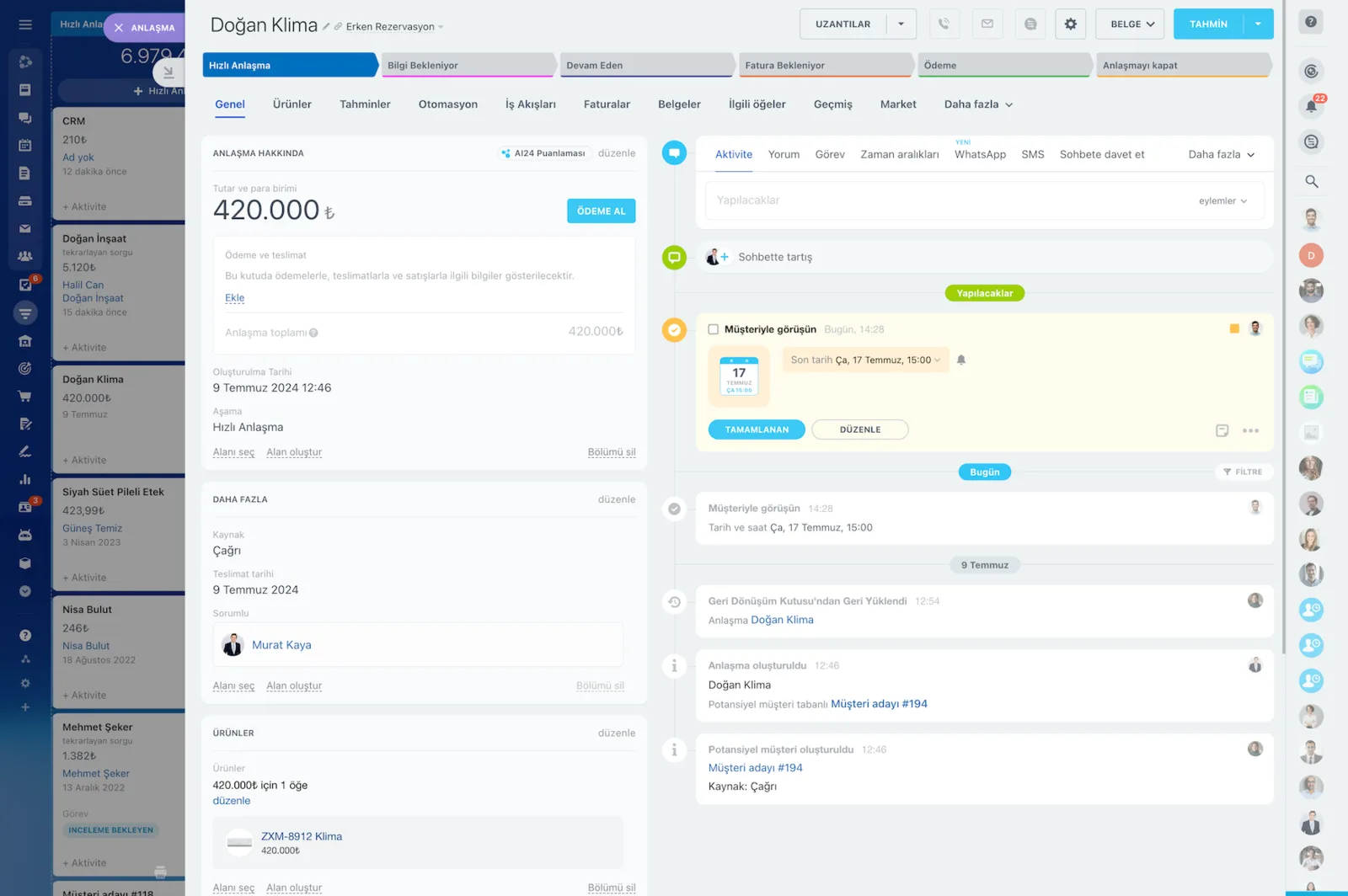
  • Qualified leads convert to deals in one click, carrying the full conversation history with them.
CRM deal card with amount, stage bar and a timeline with activity, WhatsApp and SMS tabs

How the lead flow works end to end

The flow we build runs in this order: source, form or chat or call, CRM record, duplicate check, data enrichment, lead scoring, rule-based routing, notification, task and SLA timer, first touch, nurturing, qualification, conversion to a deal, reporting. Every step is designed in the visual automation studio with drag and drop, so no code is required.

We also define the exceptions, such as the alternate contact path that kicks in after three failed call attempts.

  • The default first-response target is 5 minutes; the timer starts the moment the lead is created.
  • If the customer replies first, the timer stops and the flow moves from nurturing to selling.
  • For unreachable numbers, 3 attempts and then an email alternative after 48 hours.
  • Notifications go out to mobile, web, and email at the same time.
  • Every step is measured, so you can see how many leads are waiting at each stage.
Leads Kanban board with lead cards arranged by stage and per-stage totals

Lead capture forms without writing code

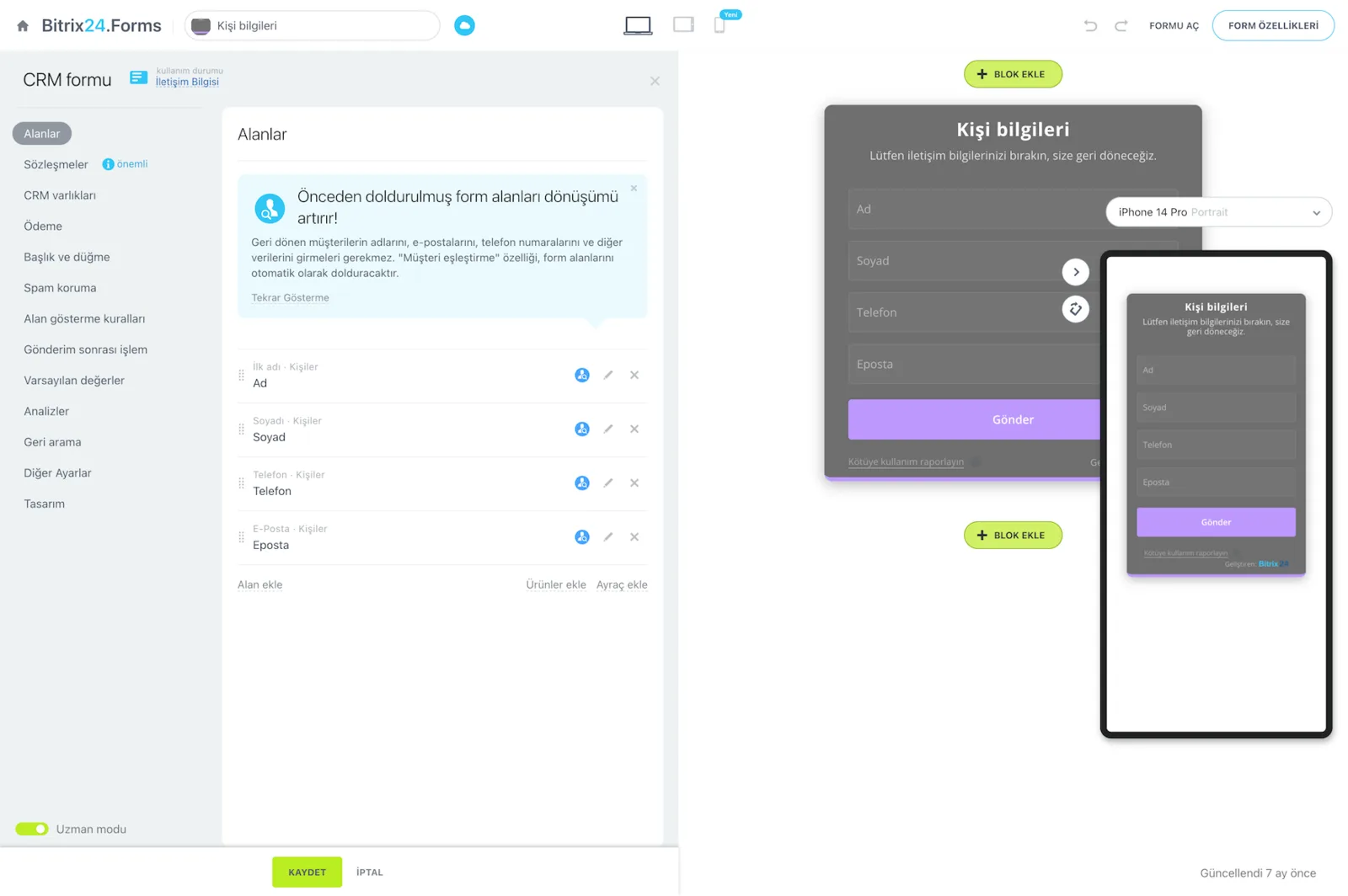
We build lead forms in minutes with the drag-and-drop form builder. The form goes on your site with a single line of embed code, and every submission lands directly in the CRM.

Field validation and deduplication rules run inside the form, so bad data is stopped at the door.

  • Full name is set as a required field.
  • Work email is required, with field validation and deduplication working together.
  • The phone field ships with input masking and country code support.
  • Consent and privacy notice fields are added, and approval is stored with a timestamp.
  • Submission instantly triggers assignment and the SLA timer.
Bitrix24.Forms form builder with the field list and desktop and mobile form previews

Smart routing and SLA rules

We do not leave lead ownership to chance. Alongside round-robin distribution, we define routing by skill, product, and territory.

Once working hours, availability, priority, and capacity rules are in place, no lead lands on a rep who is out of office or already at capacity.

  • Round-robin for sequential, even distribution.
  • Expertise-based assignment by skill, product line, or territory.
  • Flexible rules based on working hours and availability.
  • Priority and capacity limits control how many leads a rep handles at once.
  • When the SLA is breached, an escalation notice goes to the manager.
Sales automation screen with automation rules and triggers attached to each pipeline stage

Lead scoring and segmentation

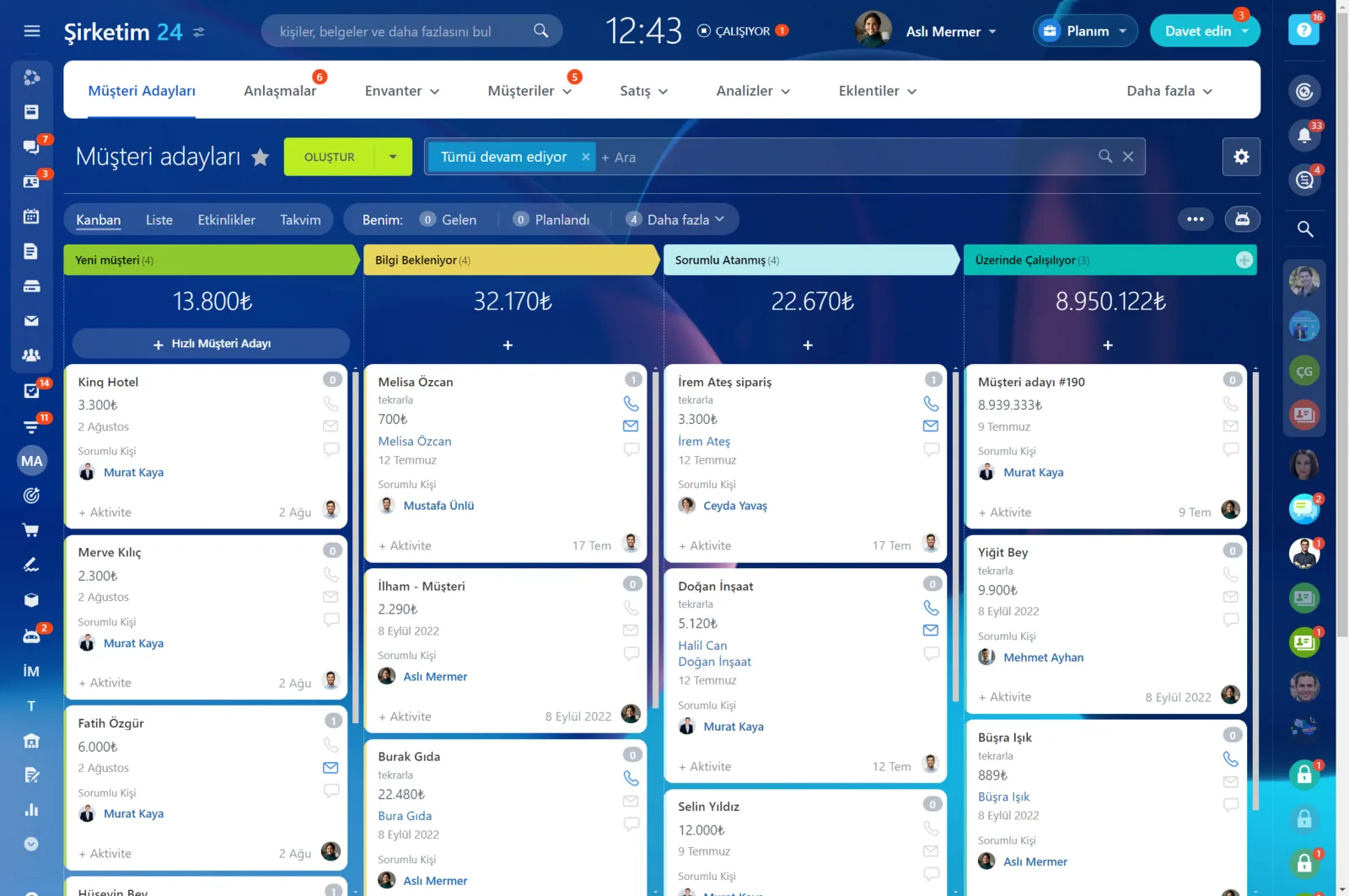
Not every lead is worth the same. We build dynamic scoring based on source quality, behavioral signals, demographics, and data completeness.

Your team calls the most mature requests first instead of working the list top to bottom.

  • Source quality: the channel and campaign a lead came from feeds the score.
  • Behavior: email opens, clicks, and site visits raise the score.
  • Demographics: industry, company size, and territory criteria are defined.
  • Data completeness: records with missing fields are flagged with a lower score.
  • Segments feed directly into nurturing flows and email campaigns.
Leads Kanban board with stage totals and lead cards

See the payoff in numbers

We measure improvement with a table, not a gut feeling. Suppose you collect 1,500 leads a month at a cost per lead of 180 TRY; even a small lift in conversion changes what your ad budget returns.

At the same time, 30 to 45 minutes of daily manual work per rep disappears.

  • Updating lists, setting reminders, and producing reports all become automatic.
  • Managers see in real time which campaign is actually paying off.
  • How many leads are waiting and who is stuck where is readable on one dashboard.
  • Compliance and audit work speeds up; consent, source, and activity trails are visible.
  • Source-level revenue reporting lets you allocate ad budget from data.
CRM analytics showing the sales funnel with conversion rates and a sales rep performance table below
CAPABILITIES

What you get

Omnichannel capture

Site forms, live chat, messaging apps, email and phone all feed the same pipeline. Adding a new channel is a configuration change, not a project.

Forms without code

We build landing page and site forms in the drag-and-drop editor and embed them with a single line of code. Submissions land straight in the CRM.

Assignment rules and SLAs

Round-robin, load balancing, skill-based routing and response timers. When a target is missed, notifications and escalation kick in automatically.

Lead scoring

We score leads on budget, industry, source and engagement history so your team calls the most qualified inquiries first.

Nurture sequences

Leads that are not ready yet move into automated email and messaging sequences. The moment they reply, the sequence stops and sales takes over.

Source-level reporting

See how many leads, deals and how much revenue each channel produced. Ad budget gets allocated on evidence instead of instinct.

BEST FIT

Who is this for?

These are the teams we deploy this module with most often. If your scenario is not listed, let's talk it through anyway.

  • Marketing teams running paid campaigns and handling dozens of inquiries a day
  • Clinics, schools and consultancies that work from appointment and quote requests
  • Brands distributing inquiries across a dealer or branch network
  • Technology and SaaS companies collecting demo and trial requests
  • Growing companies ready to leave spreadsheet-based lead tracking behind

How would this work in your process?

In a free 30-minute call we listen to your workflow and map out how this would run in your company.

Book a free consultation
SETUP

How we roll it out

We handle the setup; you just walk us through your process.

  1. 01

    Day 1: Connect the sources

    We connect your website forms, live chat, WhatsApp provider, Instagram and Facebook channels, email inboxes, and phone lines to Bitrix24. For WhatsApp Business we run the authorized provider connection for you.

  2. 02

    Day 2: Set the data rules

    We define required fields, field validation, and deduplication rules. Requests arriving with the same phone number or email merge into a single record.

  3. 03

    Day 3: Turn on assignment and alerts

    We configure round-robin and expertise-based assignment, then switch on SLA timers and mobile notifications. A first-touch task opens automatically.

  4. 04

    Migrate old records and train the team

    We move your legacy leads with the Excel or CSV import wizard and full field mapping. Then we run live training for your team and watch the first week together.

Works together with

CRMContact CenterCRM FormsOpen ChannelsAutomation RulesTelephonyEmail MarketingMarketplace and REST APIMobile App

Frequently Asked Questions

Can you migrate our existing lead list?

Yes. We map and import records from Excel, Google Sheets or your current CRM. Before the import we deduplicate the data and normalize phone and email formats.

Can we keep the forms already on our website?

You can. We connect your existing forms to Bitrix24 through webhooks or the REST API. Alternatively we build native Bitrix24 forms styled to match your site.

Can we change routing rules later?

Rules are edited from the admin screen with no code. When your team structure changes we can reconfigure them for you as part of your support plan.

How is consent handled on forms?

We add consent and privacy notice fields to every form and store the approval with a timestamp. The permission model for access and deletion requests is defined during setup.

Let's configure this around your business

Book a free intro call and we'll walk through your process and show which settings fit you.