
Stage-to-event mapping
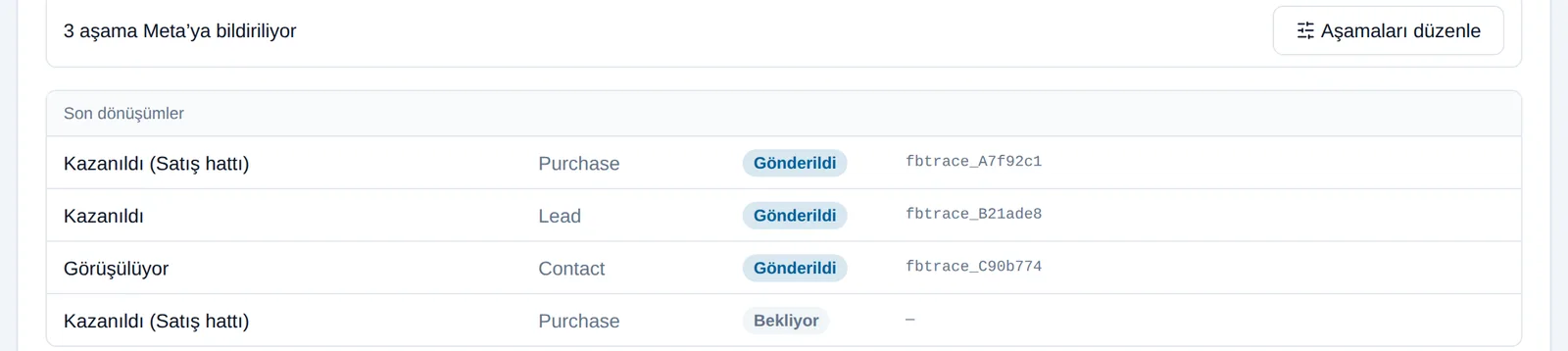
You define which Bitrix24 stage corresponds to a Lead, Contact or Purchase event in Meta.
Meta knows who filled in a form; it does not know who actually bought. The Conversions API sends that information back and changes what your campaigns optimise for.
At a glance
Ad optimisation works from the data Meta holds. If all it holds is form submissions, it optimises for form submissions:
The setup is less technical than it is a matter of judgement: deciding correctly which stage matches which event.
You define which Bitrix24 stage corresponds to a Lead, Contact or Purchase event in Meta.
On stages that carry an amount the sales value is sent too, so Meta can optimise on value.
Off (the default), dry run (the payload is built but not sent), test (with a Meta test code) and live.
Your ad account's pixel is picked from a live list; without ad account permission no pixel appears.
Phone numbers and email addresses are not sent to Meta; matching uses Meta's own lead ID.
Every row shows which stage was sent and its trace code. A failed event is retried by hand with one click.
This is the critical decision. Report too early a stage; "first contact made"; and Meta keeps optimising for low-quality leads. Report too late a stage; "treatment completed"; and the event may fall outside Meta's attribution window and never be linked to the ad. The right point is between the two: where purchase intent is clear but the process has not dragged on. The panel shows funnel statistics; how many times each stage is passed per week and how long it takes on average. We make the decision together from that data and Meta's attribution window.
Meta does not take back a conversion it has received. If you reported the wrong stage, or sent test data live, it cannot be deleted; your ad account's optimisation data is permanently polluted. That is why sending is off by default and the order is deliberate: first dry run (the payload is built and visible in the panel but does not go to Meta), then a test with Meta's test code, and only then live. By the same logic there is no bulk resend button; failed events are retried one at a time, with you looking at them.
Two technical details matter. First: every event has a fixed ID, so re-sending an event does not create a second conversion in Meta; even if it is triggered twice by accident, the numbers do not inflate. Second, and decisive for data protection: your customer's phone number and email address are not sent to Meta. Matching runs through the lead ID Meta itself generated. In other words, you do not have to share your customers' contact details with Meta in order to report a conversion.
Setup moves through them in this order; skipping a step can produce results you cannot undo.
| Mode | What happens | When it is used |
|---|---|---|
| Off | Nothing is sent | The default state |
| Dry run | The payload is built and shown in the panel but not sent to Meta | While verifying the stage mapping |
| Test | Sent with Meta's test code | While verifying on Meta's side |
| Live | Conversions are reported for real | After your approval |
How would this work in your process?
In a free 30-minute call we listen to your workflow and map out how this would run in your company.
Rushing this setup is the most expensive mistake; we follow the order exactly.
Weekly transitions and average duration per stage are reviewed; the stage to report follows from that.
Which stage matches which Meta event, and whether an amount is sent, are defined.
The payload is built and verified in the panel, then sending is tried with Meta's test code.
With your approval we switch to live mode and watch the event log and failed sends for the first weeks.
Technical detail and the live demo are on the product's own site.
The official account of operating modes, the event log and technical detail.
flexinbox.ioSetup on the Bitrix24 side and the Open Channel flow.
flexinbox.ioA live demo of the real panel with sample data, no sign-up required.
flexinbox.ioThe modules we most often roll out alongside this one; they reinforce each other in the same setup.
Clicks and open rates don't prove a campaign worked; closed revenue does. We connect your campaigns to CRM data so every lira spent can be matched against the deals it produced.
Rebuilding the same spreadsheet every week costs you hours and, worse, decision quality. We connect your CRM data to live dashboards so the report builds itself while you work.
Collecting leads is the easy part. Responding quickly, assigning correctly and following up consistently is where deals are won. We build Bitrix24 around those three things.
When the pipeline is unclear, nobody knows which deals are moving and which are stuck. We design your stages around your real sales process and make the next step visible on every card.
WhatsApp is the primary channel for customer communication in Turkey, yet in most setups it sits outside the CRM. We connect your team's own number to Bitrix24 Open Channels.
Stop opening a separate app for customers who write on Telegram. Your team's Telegram accounts connect to Bitrix24 and conversations are written to the same customer record.
An assistant that gives the first answer to enquiries arriving out of hours, trained on your own price list. When it does not know, it hands off to the Bitrix24 queue rather than inventing an answer.
It tells Meta that a lead genuinely turned into a sale. Without that information Meta optimises the campaign for "more forms filled in". With it, Meta can look for people who resemble buyers rather than people who resemble form-fillers. In practice lead volume may fall while lead quality rises.
Phone numbers and email addresses are not sent. Matching runs through the lead ID Meta itself generated, so you do not have to share your customers' contact details with Meta to report a conversion; an important detail under Turkish data protection law.
You cannot. Meta does not delete a conversion it has received. That is why setup starts in dry-run mode and why there is deliberately no bulk resend button. We verify the mapping in the panel before going live.
The stage where purchase intent is clear but the process has not dragged on. Report too early and Meta keeps optimising for low-quality leads; report too late and the event may fall outside Meta's attribution window. The panel shows weekly transitions and average duration per stage, and we decide together from that data.
Every event has a fixed ID, so a repeat send does not create a second conversion in Meta. Even if it is triggered twice by accident, the numbers do not inflate.
The Conversions API comes inside the Meta ads module and is not charged separately. The module is USD 79 per ad account per month. Meta does not charge separately for conversion reporting.
Book a free intro call and we'll walk through your process and show which settings fit you.