Features

See exactly where every deal stands right now

When the pipeline is unclear, nobody knows which deals are moving and which are stuck. We design your stages around your real sales process and make the next step visible on every card.

At a glance

  • Kanban and list views
  • Weighted forecasting
  • Stall alerts
  • One unified timeline
  • Automation for routine steps
THE PROBLEM

An invisible pipeline means surprises at month end

  • Deals sit in the same stage for weeks and nobody notices.
  • The forecast rests on gut feel rather than data.
  • The last conversation on a deal lives in someone's memory, not in the record.
  • Stage names mean different things to different people, so reports cannot be compared.
  • Loss reasons are never recorded, so the same mistakes repeat quarter after quarter.
THE FIX

We turn your sales process into a working screen

We define stages, required fields and exit criteria with you. The Kanban board becomes a daily cockpit for reps and a live forecast for management.

  • Separate pipelines per product, region or team, each with its own stages and rules.
  • Every card shows last activity, days in stage, win probability and expected close date.
  • Stage changes trigger tasks, notifications and approval steps automatically.
  • Column headers recalculate total value, weighted revenue and average time in stage in real time.
  • Loss reasons are picked from a standard list, so you can report on what costs you deals.
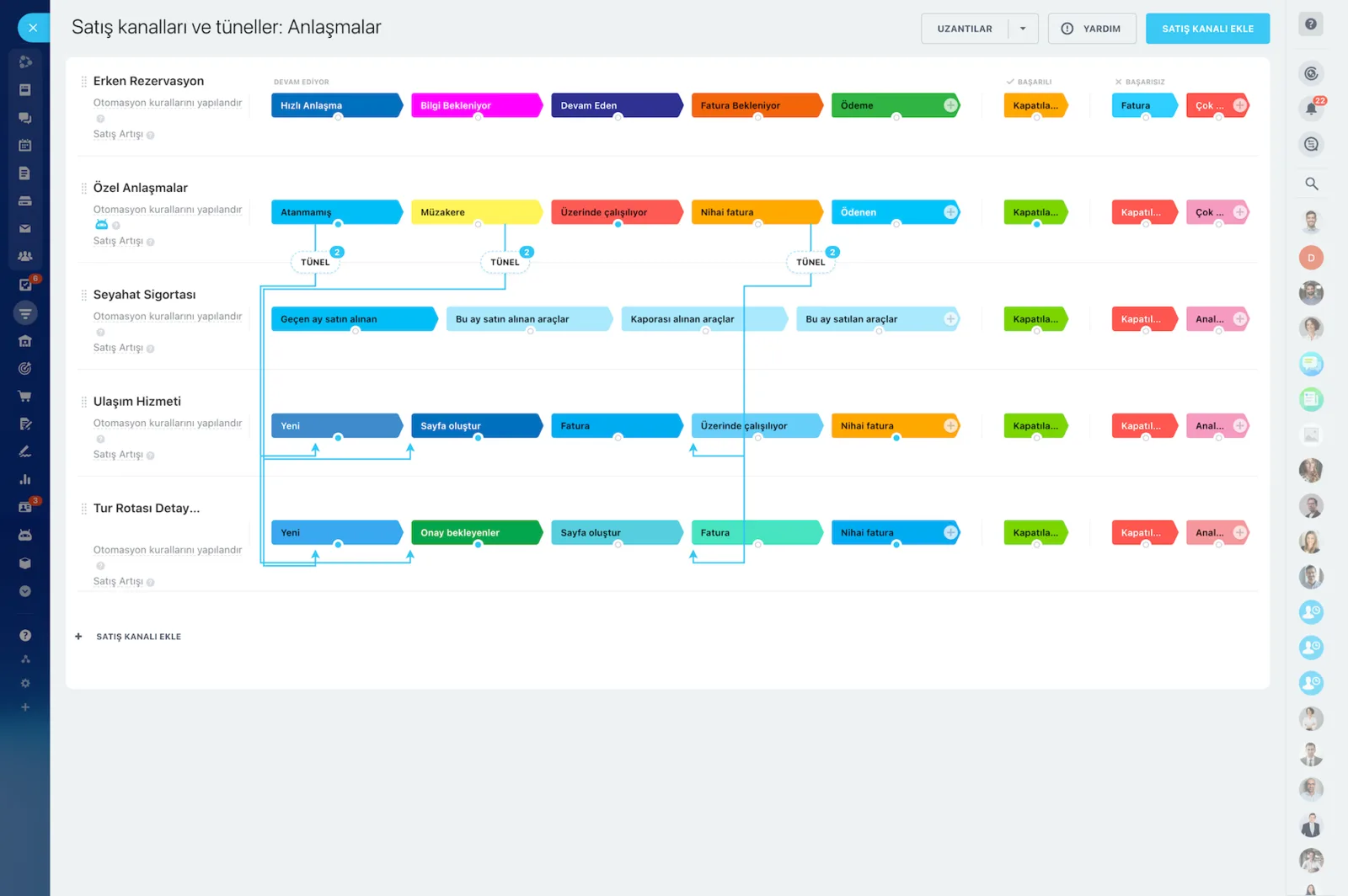
Sales pipelines and tunnels screen showing service, insurance and support pipeline stages

Kanban: the cockpit of your sales day

The Kanban board shows where you stand, how fast you are moving, and what the next best move is, all on one screen. When you drag a card between stages, more than the status changes: automations fire in the background and pending tasks update. The totals in the column headers refresh at the same moment.

  • Total value is calculated live in the column header.
  • Weighted revenue is shown using each stage's win probability.
  • Average time in stage is visible per column.
  • List, calendar, and report views present the same data from other angles.
  • Filters are saved as named views so everyone works their own list.
CRM Deals Kanban board with stage totals and deal cards

Which deal is closing, which one is stuck?

In sales, clarity matters as much as speed. Every deal card carries the last activity date, days in stage, win probability, and expected close date. We set up the signals that prompt action and push stalled deals onto the manager's dashboard.

  • Last activity date stays visible on the card.
  • Cards are flagged when days in stage cross your threshold.
  • Win probability and expected close date appear on every card.
  • Deals untouched for too long trigger an automatic follow-up task.
  • Loss reasons are picked from a standard list and reported.
Sales pipelines and tunnels screen showing several pipelines and the tunnel links between them

Weighted forecasting and target tracking

A solid pipeline shows tomorrow as well as today. We assign a win probability to each stage and roll expected close dates and expected revenue up by period. Management reads the month-end number instead of guessing it.

  • A weighted pipeline is built from stage-level probabilities.
  • Expected close dates are aggregated by period.
  • Target versus actual is compared on the same dashboard.
  • Targets are broken down by team and by rep.
  • Forecast variance is compared against prior periods.
CRM analytics showing the sales funnel with conversion rates and a sales rep performance table below

Automation: let Bitrix24 handle the repetitive work

Manual follow-ups, copy-paste emails, and forgotten reminders quietly eat a rep's day. With rule-based automation you pick the trigger and the action, and the process runs without code. We build the setup and the rule set for you.

  • Triggers: stage changed, no activity for X days, email opened or replied to.
  • Triggers: quote viewed, amount above your threshold, field updated.
  • Actions: assign a task, send an email or SMS, create a quote, start an approval.
  • Actions: update a field, change the owner, schedule an activity, call a webhook.
  • Rules are edited from the admin screen without writing code.
Sales automation screen with automation rules and triggers attached to each pipeline stage

Omnichannel conversations on one timeline

A customer starts by email, picks up speed on WhatsApp, calls with a question, and decides in a meeting. That channel mix should not fragment your record. In Bitrix24 every interaction merges chronologically onto the same deal card.

  • Email threads and call recordings land on the card automatically.
  • WhatsApp messages and live chat transcripts sit on the same timeline.
  • Social media DMs are linked to the deal record.
  • Meeting notes and files are stored on the record.
  • Handoffs and coverage take minutes, and the customer never repeats themselves.
CRM deal card with a timeline, a calendar event added to it and WhatsApp and SMS tabs
CAPABILITIES

What you get

Kanban and list views

Drag a card to move a deal and automation runs behind it. Saved filters and views let each person work from their own list.

Weighted forecasting

Each stage carries a win probability, and expected revenue rolls up by period. Management reads the forecast instead of guessing it.

Stall alerts

Deals sitting longer than your threshold get flagged, and owners and managers are notified. Fewer opportunities die quietly.

One unified timeline

Email, call recordings, WhatsApp messages, meeting notes and files sit on the same deal card in order. Handovers take minutes.

Automation for routine steps

Quote creation, reminder emails, approval requests and follow-up tasks all run on rules, freeing reps for actual selling.

Ready-made stage templates

We start from a template that fits your industry so you collect data in week one, then simplify stages together as the process settles.

BEST FIT

Who is this for?

These are the teams we deploy this module with most often. If your scenario is not listed, let's talk it through anyway.

  • B2B teams running long, multi-step sales cycles
  • Sales managers handling several product lines at once
  • Companies that need to track direct, project and channel sales separately
  • Service firms that want disciplined follow-up after every proposal

How would this work in your process?

In a free 30-minute call we listen to your workflow and map out how this would run in your company.

Book a free consultation
SETUP

How we roll it out

We handle the setup; you just walk us through your process.

  1. 01

    Discovery workshop

    We map your current sales process step by step. Together we clarify what each stage means, its exit criteria, and the fields that must be filled.

  2. 02

    Pipeline and stage design

    We start from a ready-made stage template that fits your industry, then build separate pipelines by product, territory, or team. You begin collecting data in week one.

  3. 03

    Automation and reporting setup

    We configure triggers and actions, stall alerts, the loss-reason list, and manager dashboards. We calibrate the weighted forecast model with you.

  4. 04

    Training and go-live

    We deliver role-based training to the sales team and monitor adoption for the first month. As the process settles, we simplify stages together.

Works together with

CRMQuotes and InvoicesAutomation RulesContact CenterTasks and ProjectsReports and DashboardsCalendarMobile App

Frequently Asked Questions

How many pipelines can we run?

Multiple pipelines are supported depending on your plan. We usually recommend splitting by product group, sales channel or team so reporting stays clean.

Can reps see each other's deals?

That is your call. Role-based permissions can limit reps to their own records while managers see the full team view.

Can we keep our current stages?

Yes. In the setup workshop we map your existing process, carry over the steps that work and only suggest simplifying stages that cannot be measured.

Let's configure this around your business

Book a free intro call and we'll walk through your process and show which settings fit you.