Features

Build quotes in minutes and track them in one place

Preparing a quote should not start with hunting for the right Word file. We build quote templates that pull straight from deal data, then turn approval and follow-up into a process.

At a glance

  • Template-driven quoting
  • Product and price catalog
  • Approval workflow
  • Electronic signature
  • Automated follow-up
THE PROBLEM

When quoting happens outside the CRM

  • Company name, address and tax details get retyped for every quote.
  • Nobody is sure which version in the email thread is the current one.
  • Discounts get approved verbally, with no record of who approved what.
  • Follow-up depends on individual discipline, so some quotes are never chased.
  • Win rates can only be calculated by counting files by hand.
THE FIX

From deal to quote to invoice in one flow

Quotes are generated from the deal record, so customer details, line items, quantities, discounts and tax fill in automatically. Your team reviews instead of retypes.

  • We build quote templates that match your brand; reps simply pick the right one.
  • The product and service catalog holds prices, currencies and tax rates centrally.
  • Crossing a discount threshold starts an approval step, and the decision is recorded.
  • Quotes go out by email, WhatsApp or link, and opens are logged on the deal card.
  • An accepted quote becomes an invoice or order in one click with no re-entry.
CRM Deals Kanban board with deal cards arranged by stage and per-stage totals

Quotes tied to the CRM

Every quote in Bitrix24 can be linked to a deal, lead, contact, or company. Your customer interaction history, including the quotes you send, is recorded automatically. When you build a quote from a deal, the customer name, product lines, and deal amount are filled in for you, so you only review and send.

  • A quote is linked to a deal, lead, contact, or company record.
  • Customer name, products, and amount carry over from the deal.
  • The full quote history sits on the record in date order.
  • Who sent which quote and at what stage is on the record.
  • An accepted quote converts to an invoice in one click.
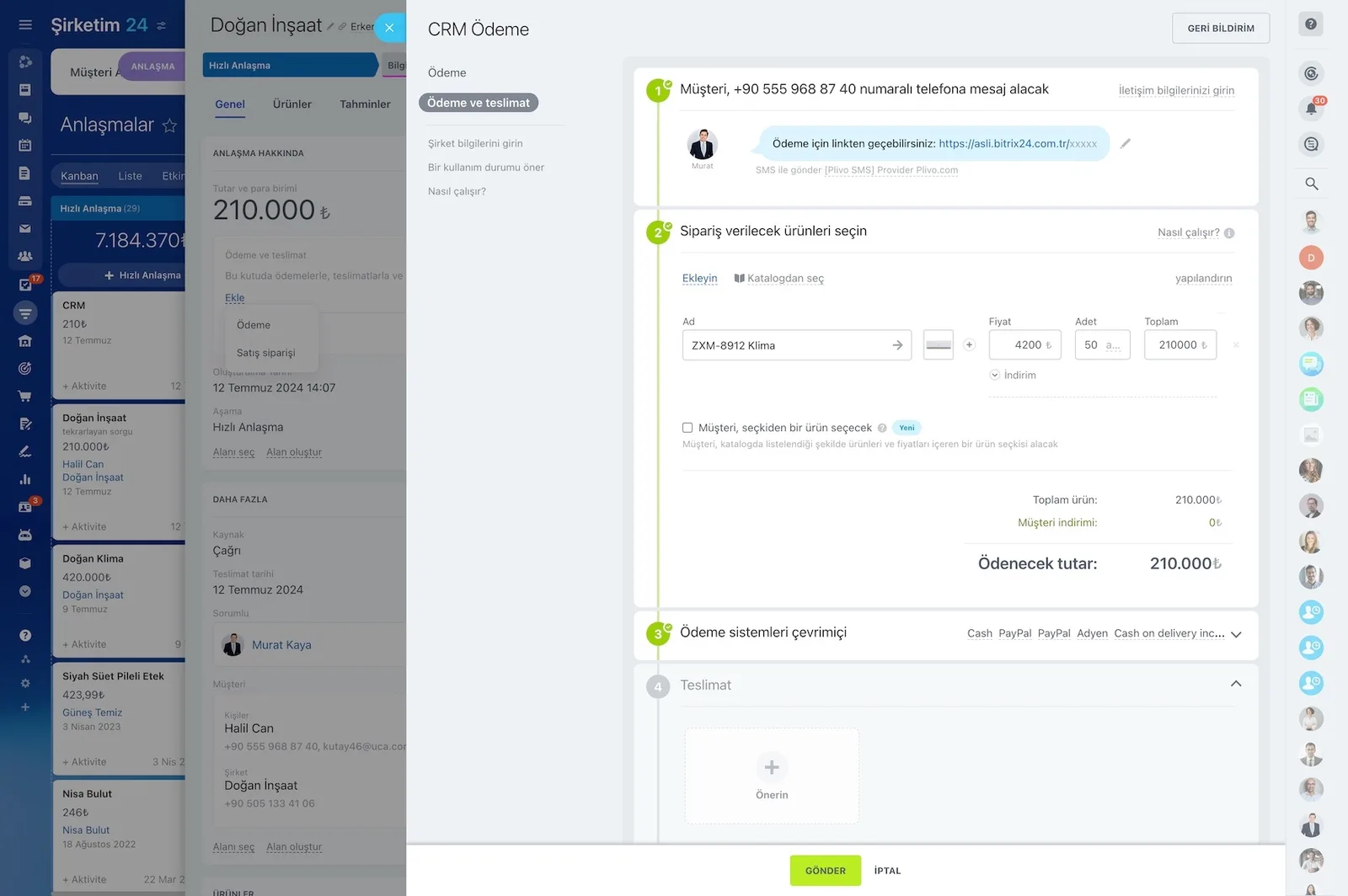
Preview of a quote document with the delivery options panel

Templates and trigger-based sending

We prepare templates for the quotes you send most often, so the team selects rather than retypes. With rules and triggers, a quote can be sent automatically when a customer submits a form on your website. Language, currency, and payment terms travel with the template.

  • Separate templates are defined per product group and customer type.
  • A form submission can trigger the quote automatically.
  • An approval step starts when the discount threshold is exceeded.
  • Approvals, rejections, and revision requests are stored with the record.
  • When the quote is opened, the event lands on the CRM card.
Preview of a prepared quote document with SMS, email and Open Channel delivery options on the right

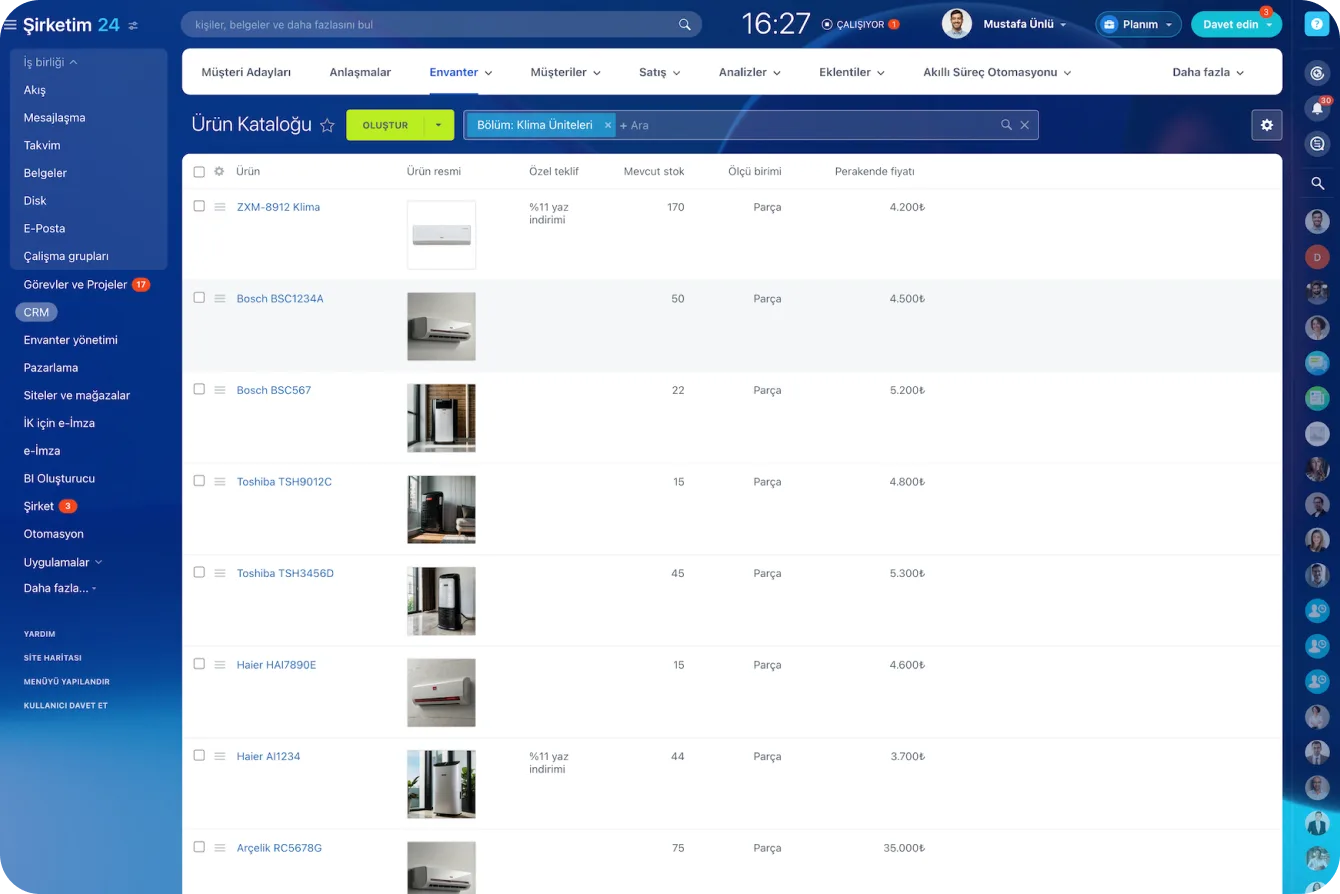
Product and service catalog

Alongside products, the catalog carries a separate service entity, so service-based businesses need no workaround. You create categories and subcategories and import products in bulk from an existing catalog. Units of measure, discount prices, images, and video are defined with each item.

  • Products and services are managed as separate entities.
  • Category and subcategory structure is built, and products import in bulk.
  • Custom fields specific to your business are added, such as size, weight, or trim level.
  • The catalog works with CRM, Sites, and Stores.
  • Every product added to a cart opens a deal in the CRM automatically.
Product Catalog screen with product images, stock and price columns

Electronic signature with Bitrix24 Sign

Your customer does not need a Bitrix24 account to sign online; you simply send a link by email, SMS, or WhatsApp. Because the signature module is integrated with the CRM, fields on an invoice can be filled automatically from the related deal. You set up document templates once and reuse them with one click.

  • The customer signs from their phone without creating an account.
  • Document fields populate automatically from the related deal.
  • Document templates can be created and saved.
  • Business process automation handles signature prep and follow-up.
  • If the process stalls, you see exactly where it is waiting and can step in.
Deal card with documents sent for signature and the signing screen opened on a mobile device

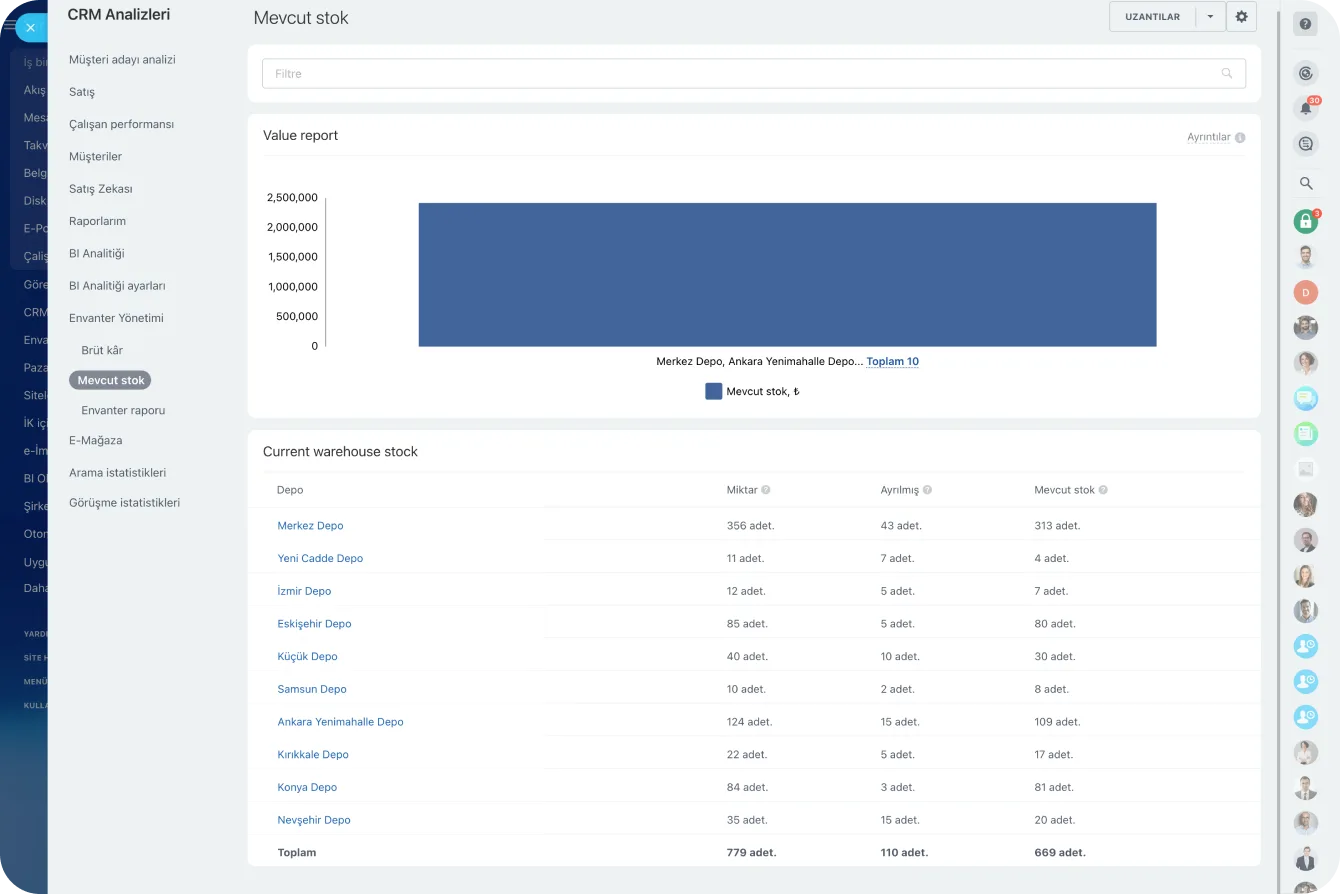
Inventory and stock visibility

You track, audit, and manage stock across multiple warehouses inside Bitrix24. Every catalog item is accounted for and traceable from supplier to customer with real-time status. When an item sells and the deal closes, your stock balance updates automatically.

  • Multi-warehouse management with inventory documents.
  • Stock receipts, sales orders, transfers, audits, and write-offs are handled.
  • Inventory reports: stock balance, gross profit, gross margin.
  • Access permissions are set per employee, from applying discounts to editing prices.
  • When stock runs low, the need to reorder becomes visible.
Per-warehouse stock chart and table
CAPABILITIES

What you get

Template-driven quoting

Different templates per product line and customer type, each carrying its own language, currency and payment terms.

Product and price catalog

Price lists, tiered discounts and exchange rates live in one place, so reps cannot quote an outdated number.

Approval workflow

Quotes above your value or discount threshold route to a manager. Approvals, rejections and revision requests are all stored with the record.

Electronic signature

Send quotes and contracts for online signing. Customers sign from a phone and the signed copy attaches itself to the deal.

Automated follow-up

A reminder task and a polite follow-up email are scheduled as soon as a quote is sent, and both stop when the customer replies.

Quote performance reporting

Volume, average value, conversion rate and loss reasons in one dashboard, including which template wins most often.

BEST FIT

Who is this for?

These are the teams we deploy this module with most often. If your scenario is not listed, let's talk it through anyway.

  • Engineering and construction firms pricing work project by project
  • Distributors and wholesalers working from a large catalog
  • Enterprise sales teams with a formal approval hierarchy
  • Service companies selling packages and subscriptions

How would this work in your process?

In a free 30-minute call we listen to your workflow and map out how this would run in your company.

Book a free consultation
SETUP

How we roll it out

We handle the setup; you just walk us through your process.

  1. 01

    Discovery and document inventory

    We review your current quote, contract, and invoice templates and map your approval hierarchy and discount rules.

  2. 02

    Catalog and template configuration

    We import your product and service catalog with prices, currencies, and tax rates. We build quote templates that match your corporate identity.

  3. 03

    Approvals, signature, and automation

    We activate the approval flow tied to discount thresholds, the e-signature templates, and the post-quote follow-up automations.

  4. 04

    Training and go-live

    We train sales and finance together. We produce the first quotes with you and refine the templates based on feedback.

Works together with

CRMProduct CatalogInvoices and PaymentsBitrix24 SignInventory ManagementCRM StoreSites and StoresAutomation Rules

Frequently Asked Questions

Can we keep our own quote design?

Yes. We rebuild your current document as a Bitrix24 template, preserving your logo, colors, terms and signature blocks.

In what format are quotes sent?

As a downloadable PDF or as a public link the customer opens in a browser. With the link option, the date and time of each open is written back to the CRM.

Do we need a separate e-signature service?

The built-in signing module covers most cases. Where a legally qualified signature is required we integrate the appropriate provider and define in the process which documents use which method.

Let's configure this around your business

Book a free intro call and we'll walk through your process and show which settings fit you.