Features

Set the target and let the whole team watch it move

A target should be more than a number people hear once a year. We define goals per person, team and period in Bitrix24, then connect them to dashboards that refresh themselves from real data.

At a glance

  • Individual and team goal cards
  • Multi-metric targets
  • Live dashboards and widgets
  • Automatic alerts and escalation
  • Period comparisons
THE PROBLEM

A target nobody can see is a target nobody works toward

  • Targets sit in a spreadsheet while actuals sit in the CRM, and the two only meet at month end.
  • Reps cannot check where their own number stands without asking a manager.
  • Team targets are never broken down to individuals, so ownership stays vague.
  • By the time a gap is noticed the period is over and there is nothing left to fix.
  • Every manager keeps a private tracker, so the same question gets three different answers.
THE FIX

We put the target inside the daily workflow

We design the goal structure with you: who owns which metric, over which period. Actuals come straight from CRM and task data, so nobody has to maintain a spreadsheet.

  • We set targets on the metrics that matter to you: revenue, units, margin, task efficiency or call volume.
  • Company targets break down to departments and then to individuals, and totals roll back up automatically.
  • Actuals are read live from CRM records and task data, with no manual entry anywhere.
  • Every employee sees their own goal card, the remaining gap and an end-of-period projection.
  • When progress drops below the thresholds we set, a notification and a task open for the manager.
CRM analytics showing the sales funnel with conversion rates and a sales rep performance table below

Targets are fed by the CRM itself

Goal tracking does not live in a separate module; it lives where selling happens. As leads and deals move across the Bitrix24 Kanban board, actuals build themselves, and one look at the board is enough to see where a deal stands.

Because we define the stages around your line of business, the measure of progress matches your real process.

  • Kanban view for deals, where a stage change is a single drag.
  • We build your own sales pipeline with stages specific to your industry.
  • Every web form, email, call or social message can become a lead and feed the same counter.
  • Deals, contacts and companies stay linked, so a number is always read with the customer behind it.
CRM Deals Kanban board with deal cards arranged by stage and per-stage totals

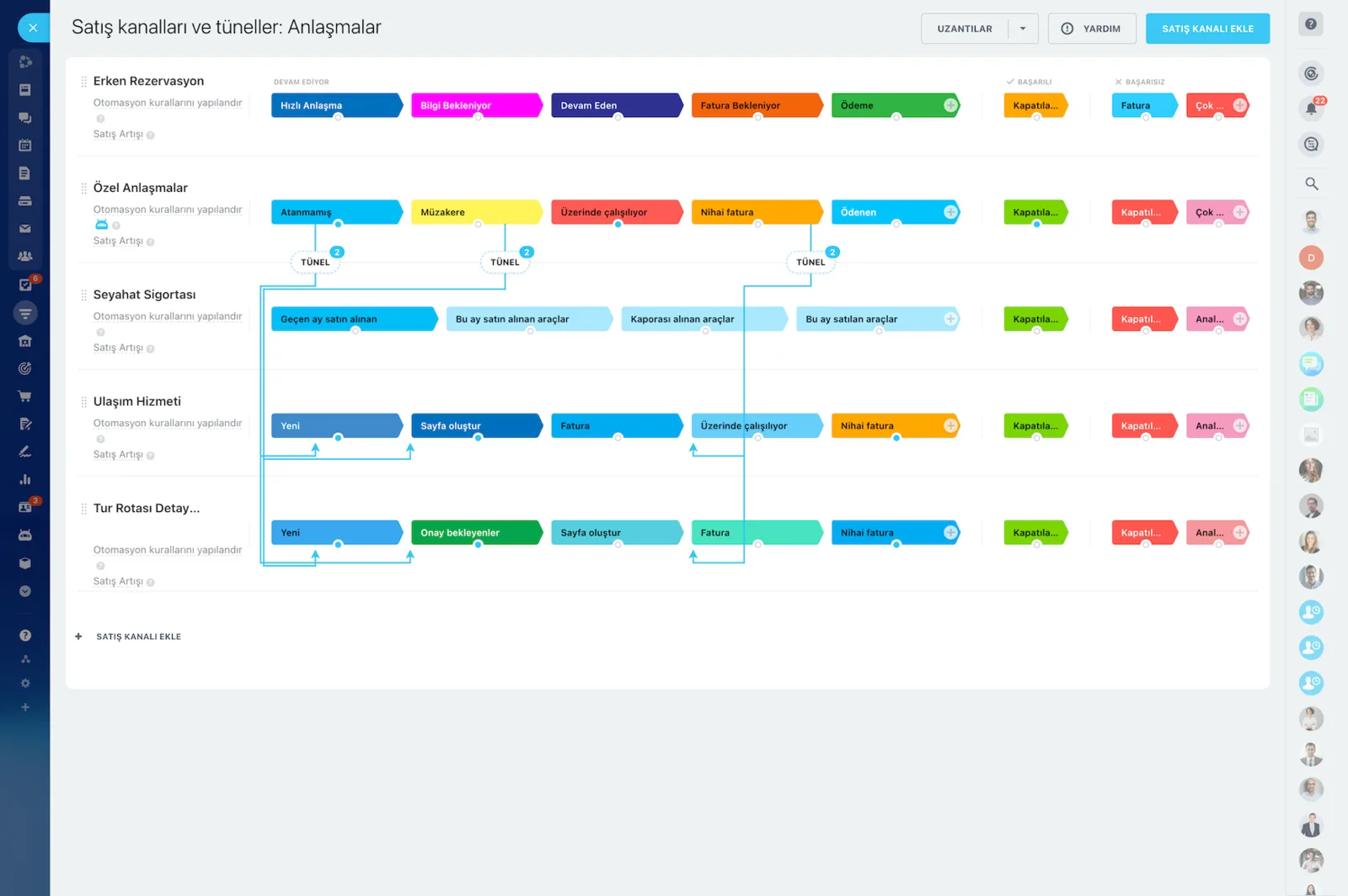
Pipelines and tunnels for multi-stage processes

A single headline number means little in a process with many steps. We split complex sales processes into several pipelines and connect them through sales tunnels, so you can see how much of the target each stage delivers.

Stage definitions and deal views can differ from one pipeline to the next.

  • Track deals on the pipeline from the moment they are created to the moment they close.
  • Several connected pipelines are managed together as one tunnel.
  • Custom deal views show different fields depending on the pipeline a deal sits in.
  • Work stuck in a stage stands out, so you act before the period ends.
Sales pipelines and tunnels screen showing several pipelines and the tunnel links between them

Automation rules and triggers keep goals honest

Learning that you are behind target at month end helps nobody. We configure Bitrix24's preconfigured automation rules and triggers to send customer reminders, rep alerts and manager notifications.

A change on a deal can also move the record automatically to a defined stage.

  • We pick the preconfigured rules and triggers that fit your process and switch them on.
  • When a condition is met, the rep gets an alert and the manager gets a notification.
  • Customer reminders stop follow-ups from slipping through the cracks.
  • Automated stage changes keep the underlying data current at all times.
Sales automation screen with automation rules and triggers attached to each pipeline stage

Define your own metrics with custom fields

Standard fields rarely cover everything a company wants to measure. We add custom fields to deal and contact records so the metric behind the target is stored on the record itself.

Reports and dashboards then read those fields directly, with no extra calculation step.

  • Add custom fields such as region, product group, channel or campaign to deals.
  • Carry the extra information your industry needs on contact records.
  • Custom fields become filters and breakdowns in reports.
  • The field structure can grow later without disturbing existing data.
BI Builder dashboard showing the value, count, average size and lifetime of deals in progress

Who sees which number: roles and access permissions

Transparency does not have to mean everyone sees everything. Depending on your number of departments and the complexity of the process, we create several roles in Bitrix24 CRM with their own access permissions.

You decide separately whether a user can view, edit, delete, import or export a given record.

  • When each stage belongs to a different person, access is limited to that stage.
  • Specific fields can be made invisible to specific users.
  • View, edit, delete and export rights are granted individually.
  • Roles follow your org structure, so people can change without the setup changing.
Access Permissions screen assigning full access, limited access or administrator roles to users and groups
CAPABILITIES

What you get

Individual and team goal cards

Target, actual and percent complete for the period appear on one card. Managers look at the team total, employees look at their own number.

Multi-metric targets

You are not limited to one revenue figure. New customers, average order value, collection rate and activity volume can all be tracked at once.

Live dashboards and widgets

We place goal widgets on the Bitrix24 start page, so the first thing the team sees each morning is their own progress.

Automatic alerts and escalation

Teams that fall behind halfway through the period trigger a notification. Problems surface while there is still time to act, not at month end.

Period comparisons

How does this month compare with last month, or this quarter with the same quarter last year? The trend also tells you whether the target itself is realistic.

Bonus-ready output

When the period closes, the achievement table exports in one click. Commission and bonus calculations run off the same data everyone already saw.

BEST FIT

Who is this for?

These are the teams we deploy this module with most often. If your scenario is not listed, let's talk it through anyway.

  • Sales teams working to monthly and quarterly quotas
  • Retail and dealer networks with targets by branch or region
  • Customer service units measured on call and appointment volume
  • HR and operations managers tracking departmental KPIs
  • Growing companies that want a transparent basis for bonus schemes

How would this work in your process?

In a free 30-minute call we listen to your workflow and map out how this would run in your company.

Book a free consultation
SETUP

How we roll it out

We handle the setup; you just walk us through your process.

  1. 01

    Goal workshop

    We sit down with your sales and management team to agree who owns which metric, how long a period runs and how the target breaks down.

  2. 02

    Pipeline and field setup

    We build the pipelines, stages and custom fields behind each metric, and import your existing target sheet mapped to people and periods.

  3. 03

    Automation and alert rules

    We switch on reminders, rep alerts and manager notifications, and agree together which threshold triggers which message.

  4. 04

    Dashboards, permissions and training

    We configure roles and access rights, place goal widgets on the start page, and show the team how to read their own card.

Works together with

CRM deals and sales pipelinesAutomation rules and triggersAnalytics and reportsTasks and projectsBitrix24 mobile appREST API and Bitrix24 Market apps

Frequently Asked Questions

Can we import our existing targets from Excel?

Yes. We map your current target table to people and periods and load it into Bitrix24. After that managers can update targets themselves from their own screen.

Can employees see each other's targets?

That is entirely your call. When we set up permissions you choose between private cards, team-level transparency or a fully open model.

Can we set goals for non-sales teams?

You can. First response time for support, time to hire for HR, on-time delivery for production; all of these are tracked in the same structure.

How often do the numbers update?

Actuals are read live. The target itself is set at the start of the period and can be revised mid-period if needed, with the previous value kept on record.

Let's configure this around your business

Book a free intro call and we'll walk through your process and show which settings fit you.