Features

Let customers book their own slot

Scheduling shouldn't cost you a day of phone calls. We set up a booking flow where clients choose the service, the specialist and the time; and every booking lands in the CRM with its record.

At a glance

  • Self-service booking form
  • Resource and specialist calendars
  • Automatic reminders
  • Automatic CRM conversion
  • Waiting lists
THE PROBLEM

Phone-based booking leaves the calendar half empty

  • Bookings come in by phone and chat while the team spends the day scheduling.
  • Two records land on the same slot and a client waits at the door.
  • No-show rates are high and the freed slot never gets refilled.
  • Availability is scattered across separate calendars nobody cross-checks.
  • Visit history never reaches the CRM, so repeat-sale opportunities are missed.
THE FIX

How the booking flow we build works

We embed a booking form on your site and social profiles. The client picks a time, the system locks the calendar, a CRM record opens and reminders go out on their own.

  • Each specialist or service gets its own working hours, slot length and capacity.
  • Unavailable hours never appear in the form, so double bookings can't happen.
  • Every booking links automatically to a CRM deal and the related contact.
  • Confirmations, reminders and change notices go out by email, SMS or WhatsApp.
  • When a slot is canceled, it's offered to the next person on the waiting list.
  • Past visits stay on the record, so checkups and repeat bookings are easy to plan.
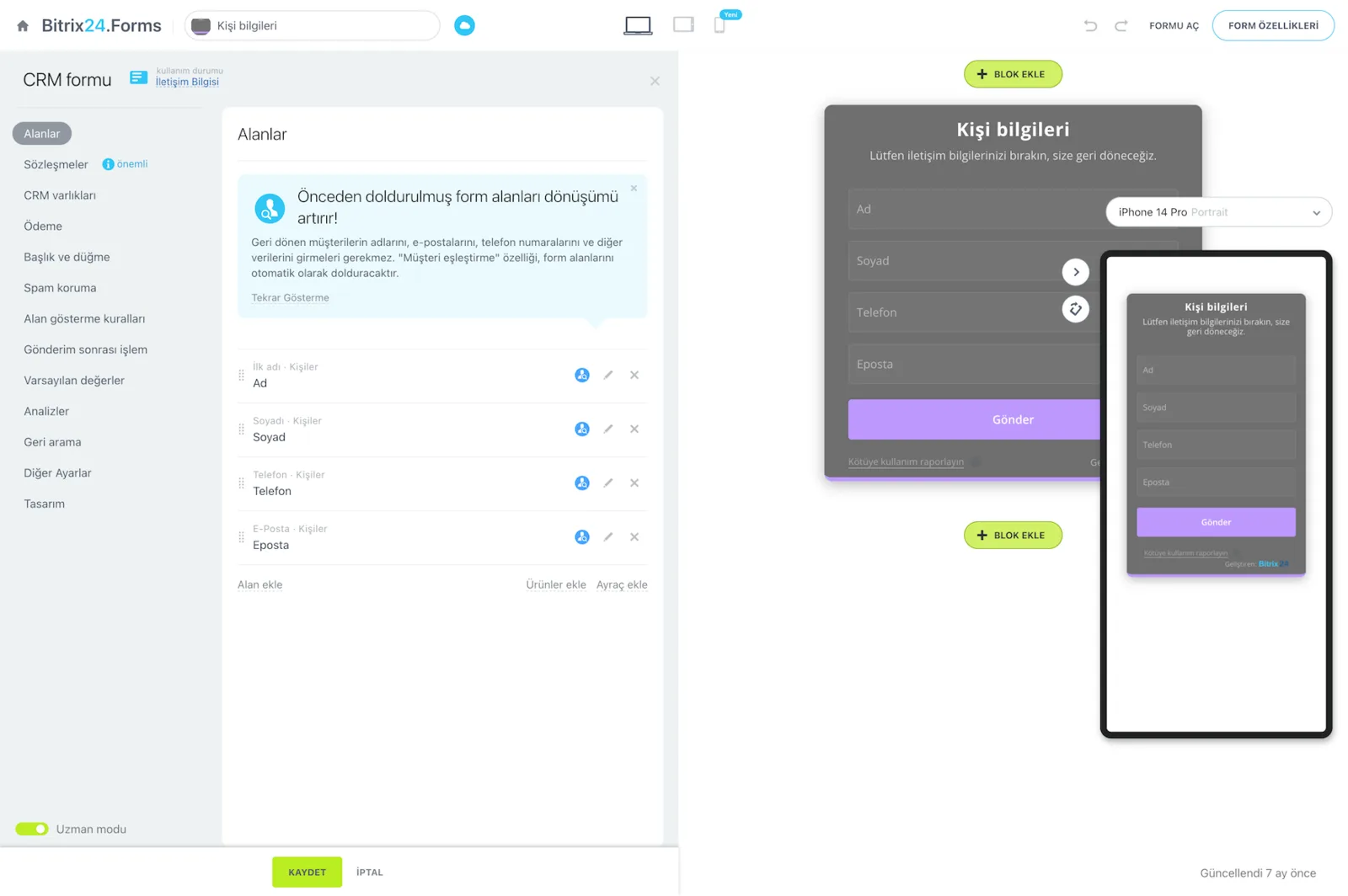
Bitrix24.Forms form builder with the field list and desktop and mobile form previews

Customers pick their own slot

We configure the booking form and embed it on your website and social media profiles. Your customer chooses the service, the specialist, and the time slot, which removes the calls, the message traffic, and the manual scheduling load on your team.

An appointment-driven business can run at full capacity without drowning in that back-and-forth.

  • The form is embedded on your site and the link works on your Instagram and WhatsApp profiles
  • Customers complete service, specialist, and time selection on one screen
  • Only genuinely available slots are ever shown
  • The burden of taking bookings by phone leaves your team
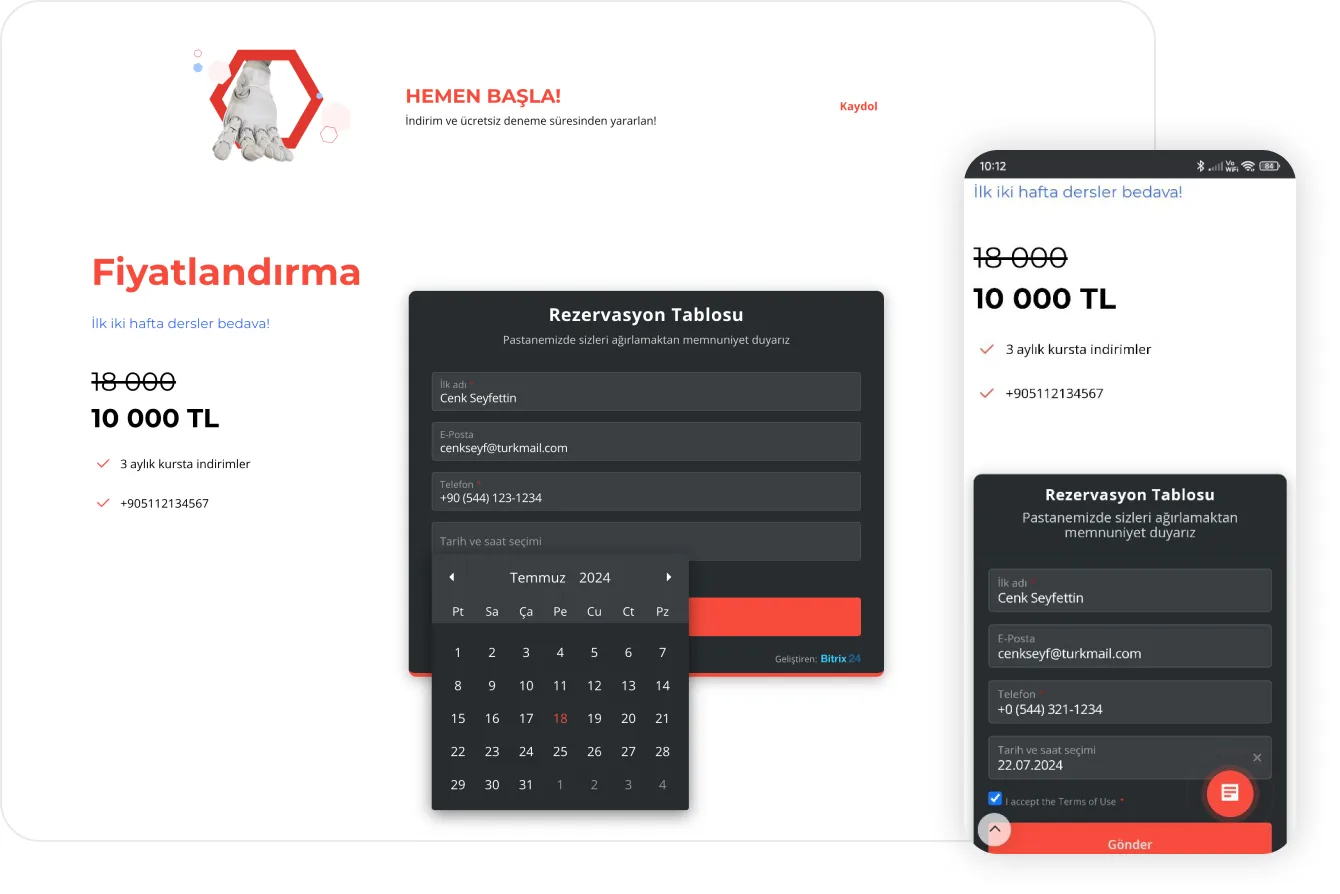
Booking form on a website shown on desktop and mobile with the date and time picker open

A calendar built around your business

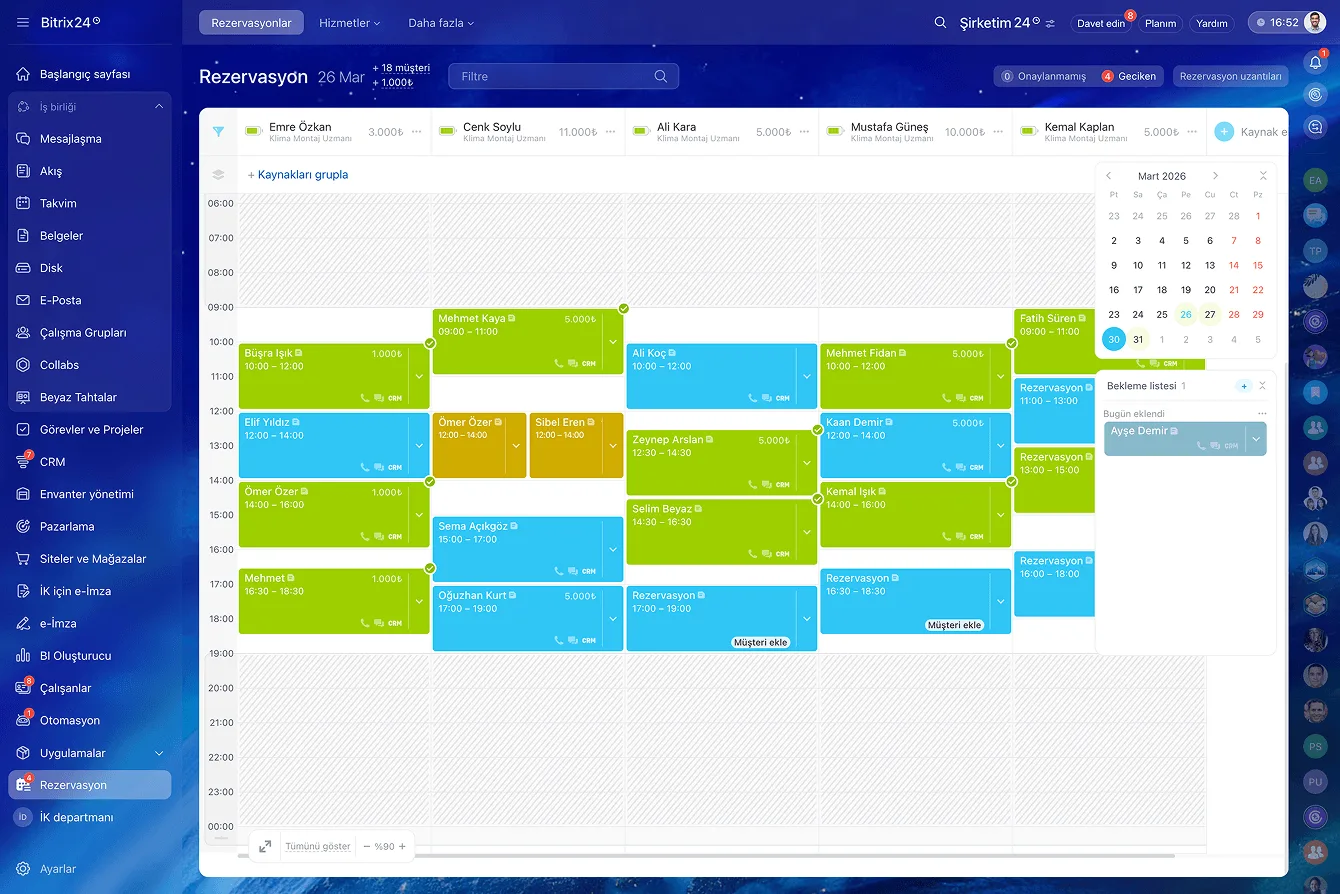
Every team member or service has its own working hours, appointment lengths, and calendar.

Once that structure is in place, managing multiple specialists, preventing double bookings, and seeing the whole operation at a glance become easy. Conflicts stop being a matter of attention and get blocked by the system.

  • Separate calendars per specialist, service, room, or piece of equipment
  • Different appointment length and capacity for each service
  • Double bookings are prevented at the system level
  • The whole operation is visible on one screen in day and week views
Booking resource calendar with agent columns, time slots and filled appointments

Every booking becomes a CRM deal

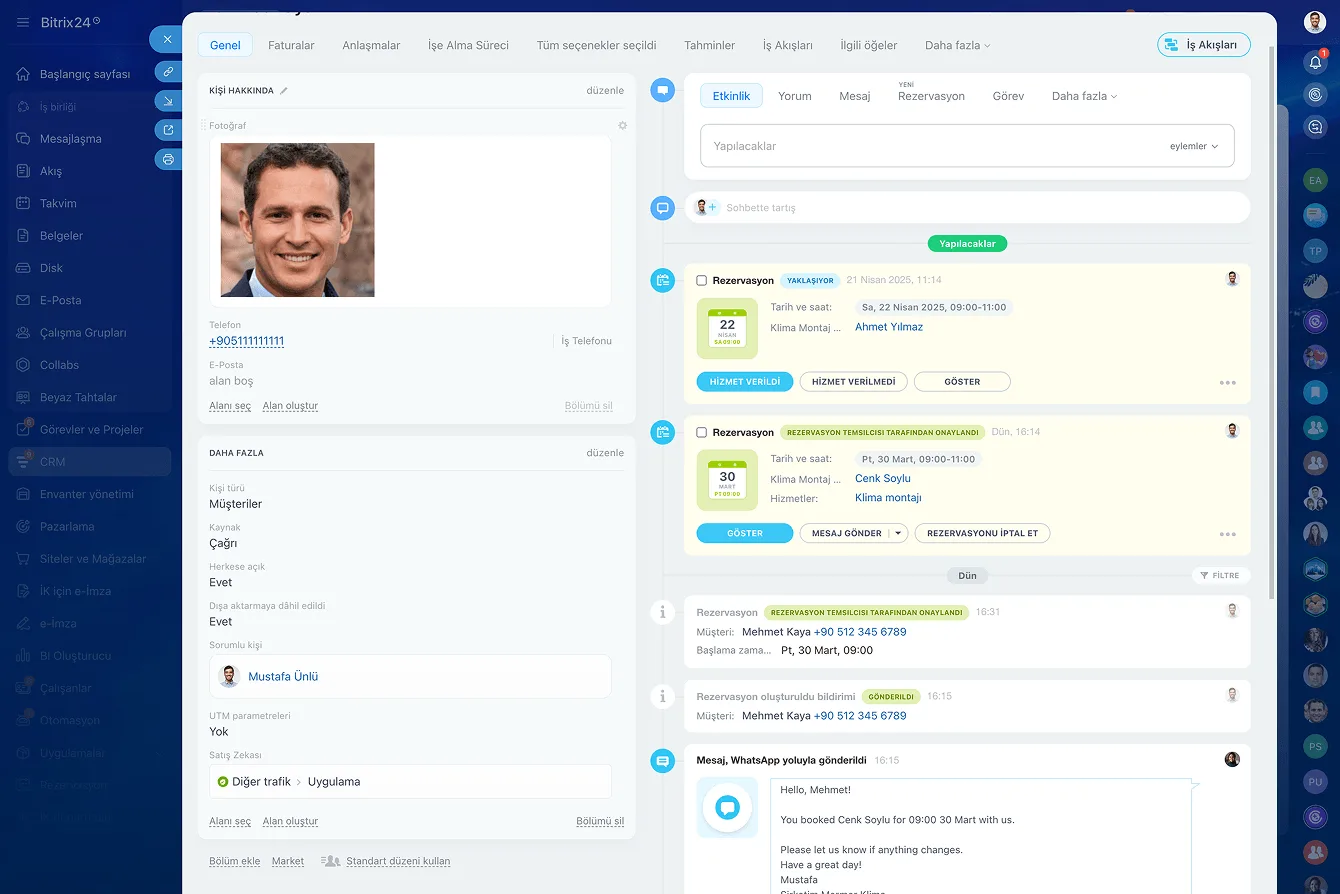
Each appointment turns into a deal, and that deal is linked to the matching contact in your Bitrix24 CRM.

Confirmations, reminders, reschedules, and cancellations are recorded automatically on the same record. So you don't just fill your calendar, you turn every visit into structured data.

  • The booking → deal → contact chain builds itself
  • Confirmations, reschedules, and cancellations are written to the record automatically
  • Customer history, communication, and bookings sit in one place
  • Rebooking a returning customer takes a few clicks
CRM contact card timeline with booking confirmations and a WhatsApp notification that was sent

We cut no-shows and fill the gaps

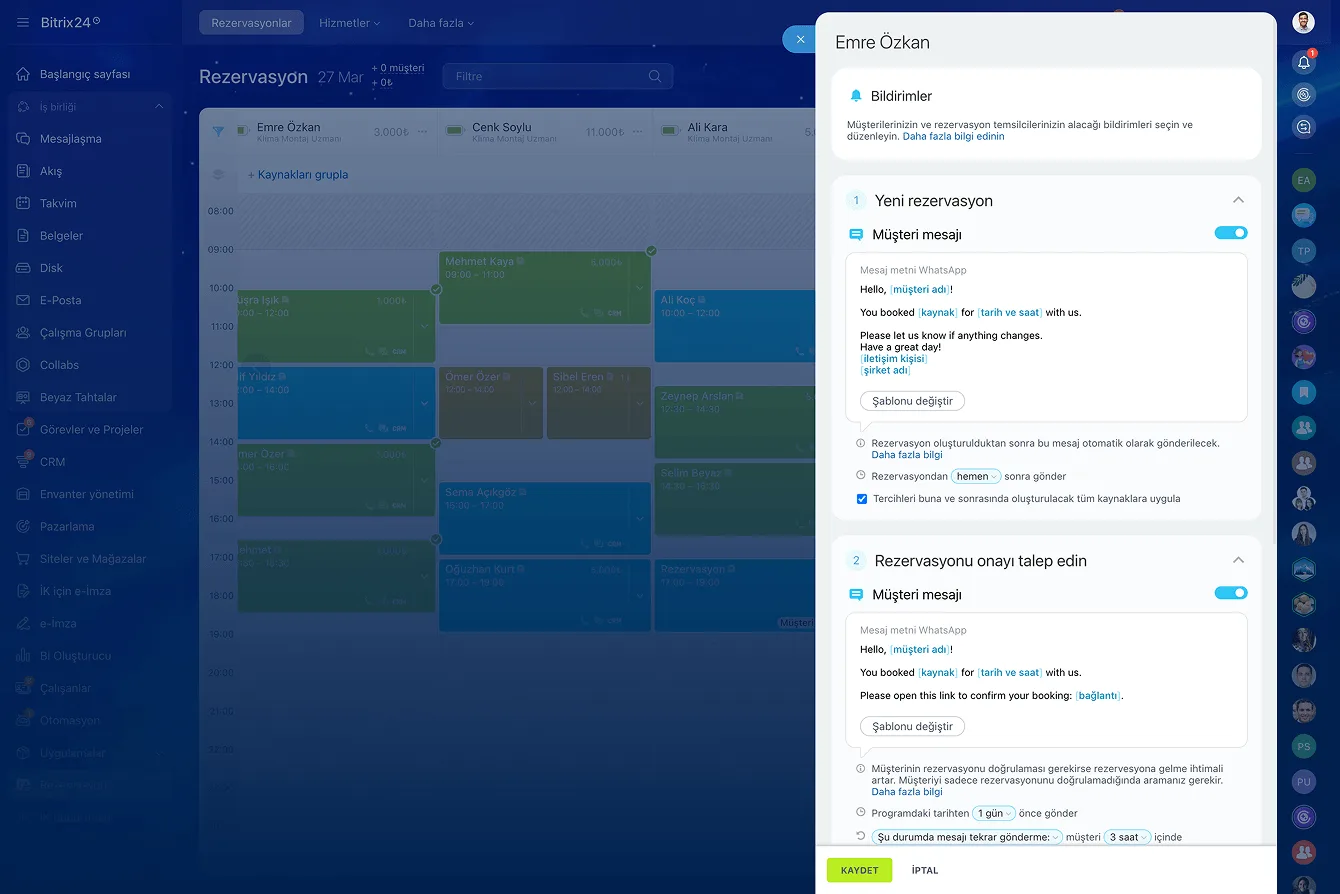
A missed appointment costs both time and money. Smart notifications, confirmations, and waiting lists keep gaps out of your schedule.

For a small clinic or a rental service, well-timed reminders alone can lift daily revenue noticeably.

  • Automatic reminders sent at the right time reduce forgotten visits
  • Reminder text and send timing are tailored to your business
  • When someone cancels, the freed slot is offered to the waiting list
  • Your resources stay at full capacity even on the busiest days
Booking notification settings with WhatsApp reminder templates and confirmation request rules

Structured history for repeat-driven businesses

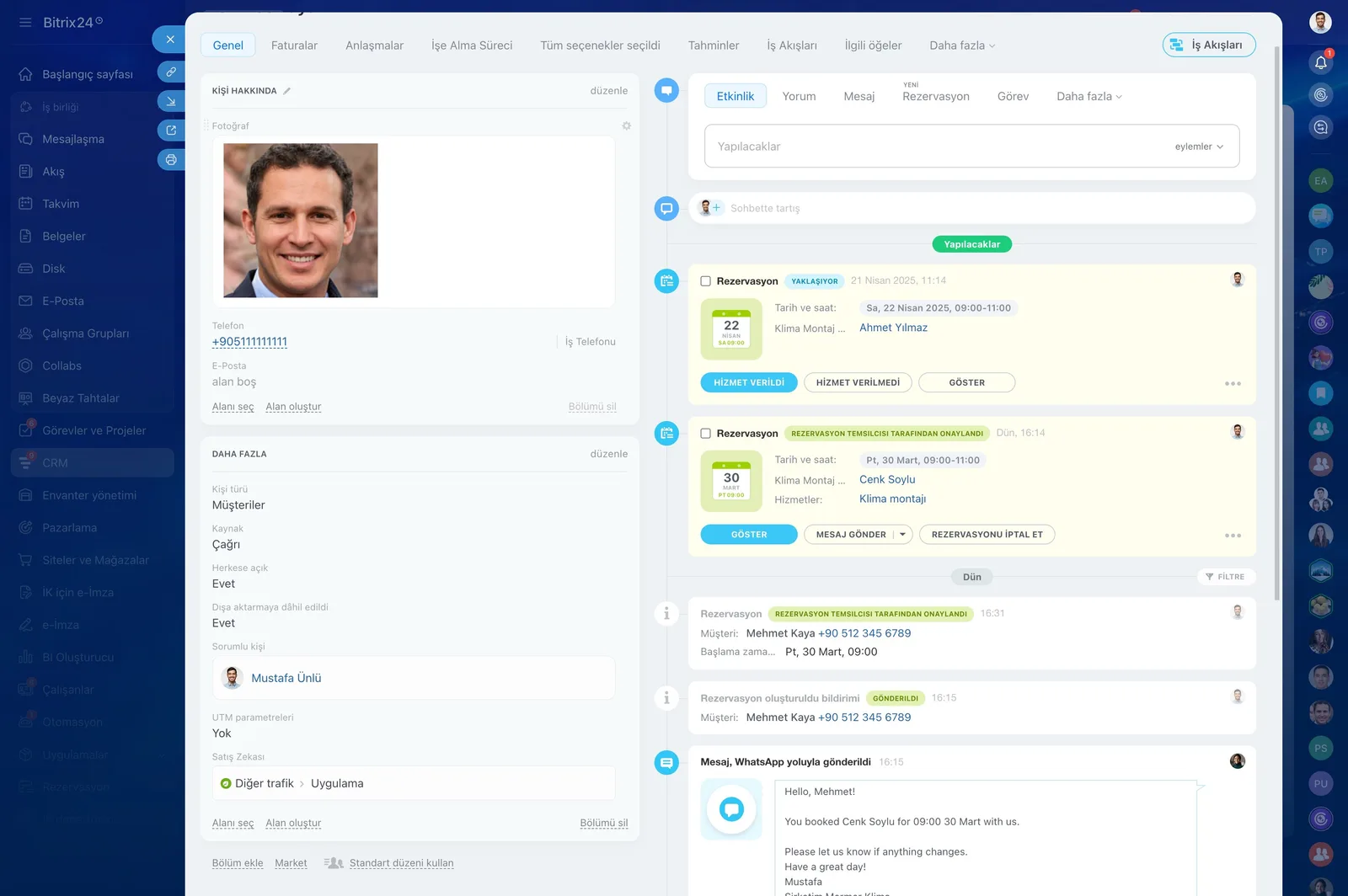
As booking data accumulates, your marketing gets smarter too. A dental clinic can see a patient's visit history instantly and create the next check-up appointment.

A beauty salon can identify loyal customers and send them personalized offers based on the services they've had.

  • Visit history sits on the contact card in structured form
  • Check-up, maintenance, and renewal appointments are planned from that history
  • Loyal customer segments are separated out and given personalized offers
  • The path from first booking to loyal customer is tracked in one system
CRM contact card timeline with upcoming bookings, confirmation states and a WhatsApp reminder that was sent

Booking isn't standalone; it's part of the platform

Booking runs as part of the Bitrix24 platform alongside CRM, marketing, collaboration, and automation tools. You stop switching between calendars, spreadsheets, and messaging apps.

Through the Contact Center you reach customers by email, SMS, social media, or messaging apps from the same place.

  • Staff see upcoming appointments while managers get full visibility on performance
  • The Contact Center puts email, SMS, social media, and messaging in one point
  • More than 35 integrated tools keep you inside one account
  • Automated workflows make sure no customer request slips through
CRM Deals Kanban board with deal cards arranged by stage and per-stage totals
CAPABILITIES

What you get

Self-service booking form

Embedded on your site and linked from Instagram, the form lets clients choose service, specialist and time themselves. Phone traffic drops sharply.

Resource and specialist calendars

We set up calendars per person, room, chair or piece of equipment. You see the whole operation on one screen and conflicts are blocked at the system level.

Automatic reminders

Reminders go out before the appointment with wording you control. No-shows drop and fewer slots go to waste.

Automatic CRM conversion

Each booking becomes a deal linked to the contact. Confirmations, reschedules and cancellations are logged on that same record.

Waiting lists

A canceled slot is immediately offered to someone on the waiting list. Your resources stay at full capacity even on the busiest days.

Follow-up marketing

We build segments from service history to drive checkup, maintenance and renewal campaigns. One-time visits turn into regulars.

BEST FIT

Who is this for?

These are the teams we deploy this module with most often. If your scenario is not listed, let's talk it through anyway.

  • Dental, aesthetic and outpatient clinics that run on appointments
  • Salons, barbershops and wellness centers
  • Consulting, accounting and law firms that work session by session
  • Field teams scheduling service, installation and maintenance visits
  • B2B sales teams booking demos and discovery calls

How would this work in your process?

In a free 30-minute call we listen to your workflow and map out how this would run in your company.

Book a free consultation
SETUP

How we roll it out

We handle the setup; you just walk us through your process.

  1. 01

    We define services, resources, and working hours

    Together we map how long each service takes, which specialist works which days and hours, plus breaks and capacity. Shared resources such as rooms and equipment are defined at this stage too.

  2. 02

    We build and publish the booking form

    We match the form to your brand colors, embed it on your website, and make the link usable on your social profiles. We decide together which fields are required so you don't lose conversions.

  3. 03

    We switch on reminders and the CRM link

    We set up confirmation, reminder, and cancellation messages over email, SMS, or WhatsApp. Every booking is tied to a deal and a contact, and we add the waiting-list rule as well.

  4. 04

    We train the team and go live

    We train reception and specialist staff on daily use. Over the first weeks we watch no-show and occupancy metrics with you and fine-tune reminder timing.

Works together with

CRM deals and contactsContact CenterWhatsApp BusinessSMS providersEmail marketingShared calendars and calendar syncWebsite builder and formsAutomation robotsMobile app

Frequently Asked Questions

How do you add the booking form to our website?

We place the embed code Bitrix24 generates and match the styling to your brand. If you don't have a site, the booking link works just as well from Instagram or WhatsApp.

Our specialists all keep different hours; is that a problem?

Not at all. Working days, hour ranges, breaks and slot lengths are defined per specialist or service. Clients only ever see genuinely available times.

Can reminders go out over WhatsApp?

Yes, if you have a WhatsApp Business API connection we route reminders through it. SMS and email are available as alternatives or as fallbacks.

Can you migrate our current appointment book?

We can. Bookings and client records from spreadsheets or your current software are migrated with field mapping, and we plan the cutover week together to avoid duplicates.

Let's configure this around your business

Book a free intro call and we'll walk through your process and show which settings fit you.