Features

See exactly where your team's capacity is actually going

Logging hours on its own produces a pile of numbers. The value comes from knowing which work those hours went into, so we tie time records directly to tasks and projects.

At a glance

  • Online time clock
  • Task-level time entries
  • Estimate versus actual
  • Capacity view
  • Invoice-ready breakdown
THE PROBLEM

Nobody can answer where the time went

  • Timesheets live in one file and the actual work in another, and the two never meet.
  • Teams billing by the hour reconstruct billable time from memory at invoicing.
  • Because nobody knows how long a job really took, the next quote is priced wrong.
  • Which project is eating the capacity only becomes clear once the budget is blown.
  • In remote teams there is no record of when the working day started or ended.
THE FIX

Time is recorded where the work happens

Clock-in hours and task time live in the same system. People start their day without switching apps, log time against the right task, and the reports build themselves.

  • The built-in online time clock starts, pauses and ends the day from a laptop or a phone.
  • Time is logged against the project task, so the effort behind every job is on record.
  • Estimated and actual duration sit side by side, highlighting the stages that consistently overrun.
  • Time reports by project, person or task type are produced and repeated on a set schedule.
  • For hourly services, the work breakdown is reviewed on one screen before invoicing.
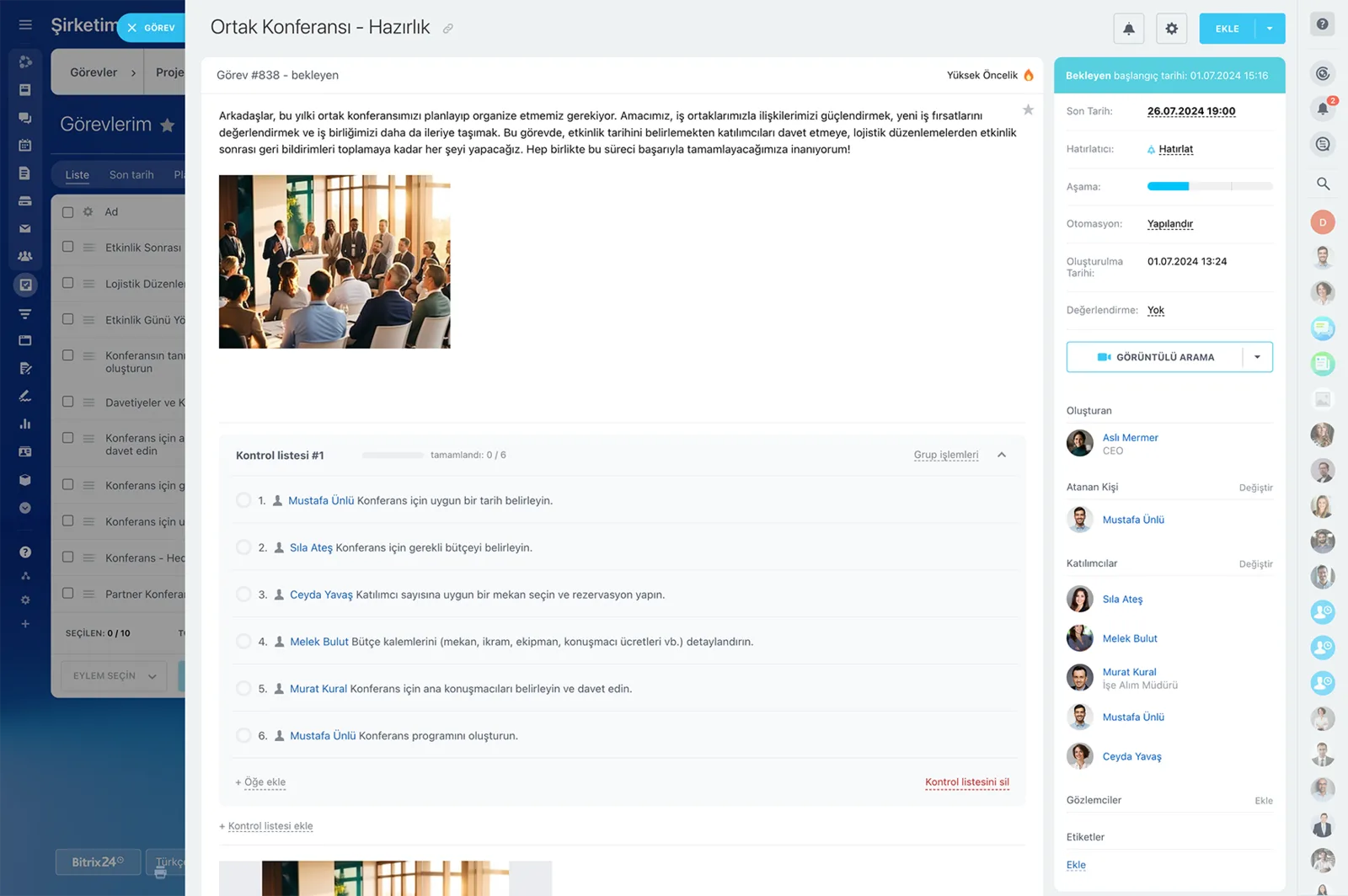
A Bitrix24 task card with description, checklist, participants, deadline and automation fields

Log time directly against the project task

Knowing how time is spent is about more than recording working hours; the value is in knowing which work absorbed it.

In Bitrix24 working time is tied to the related project task, so estimated and actual effort sit next to each other. The stages that take more effort than expected become visible at a glance.

  • Every logged hour is stored with the task and project it belongs to.
  • Work in progress and completed work can be reviewed separately.
  • Past durations on similar tasks become the reference for new planning.
  • The gap between estimate and actual is reported by task type.
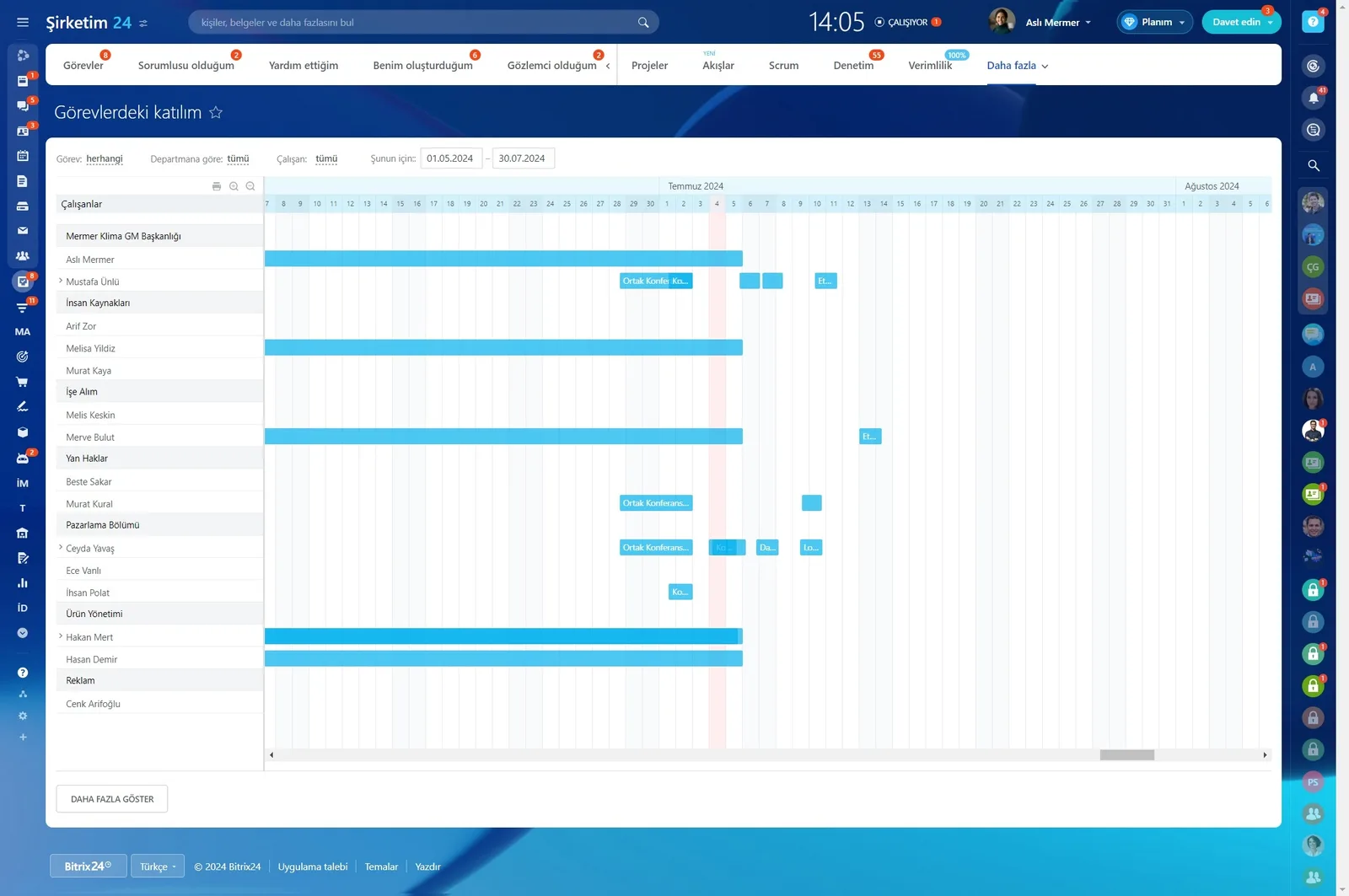
Task participation report showing workload on a timeline by department and employee

Assess team capacity project by project

Time records show how much time team members give to each project and each type of task.

That view helps you spot capacity imbalances and work running longer than expected before the budget is gone. Project managers can reprioritize based on the data in front of them.

  • Time distribution appears in one table, broken down by project and task type.
  • The fit between new work and current capacity is checked before you commit.
  • Projects eating the most capacity surface during the period.
  • Priority changes rest on real effort data rather than on guesswork.
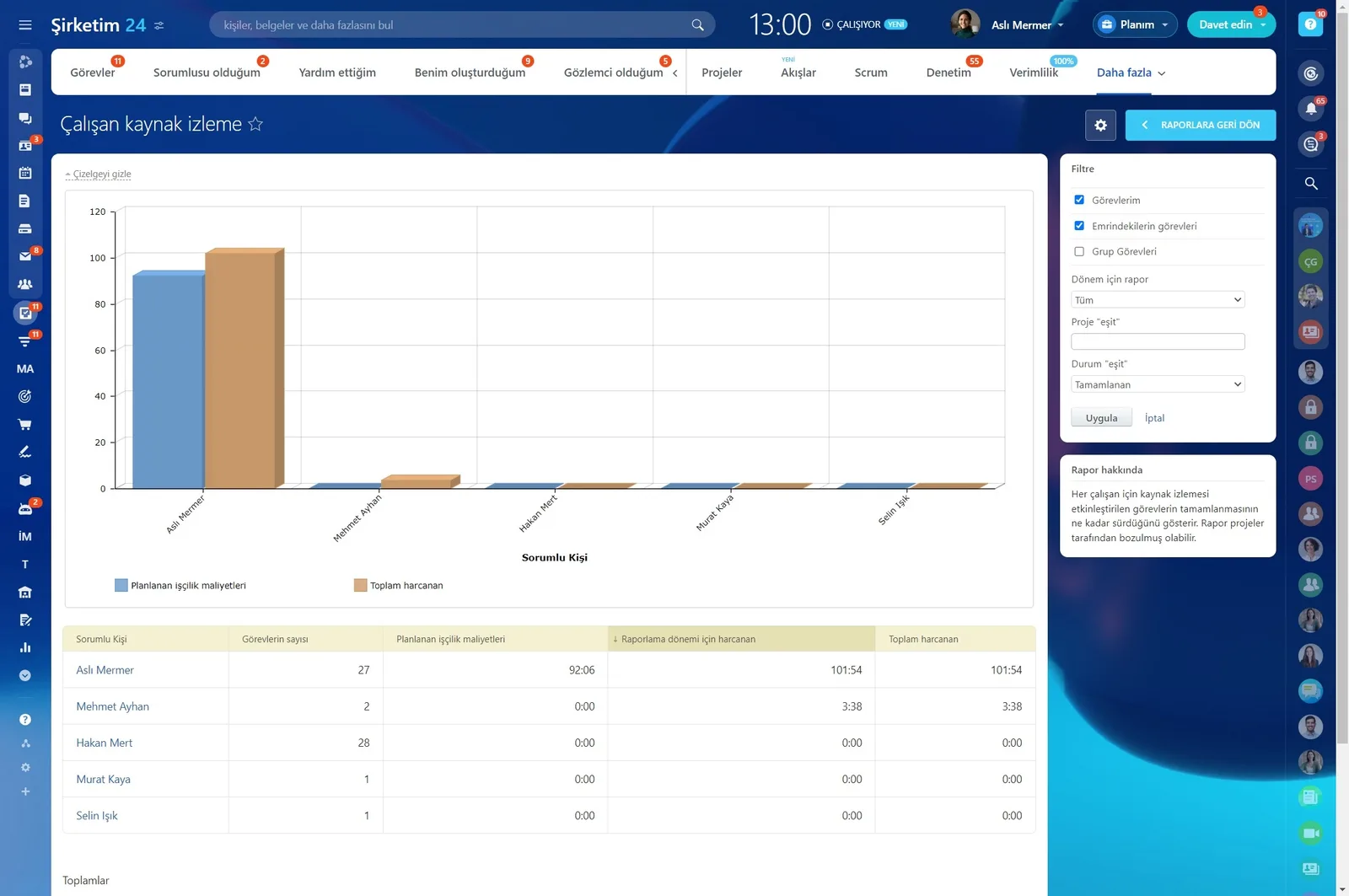
Resource monitoring report comparing planned labour cost against time actually spent

Compare working time through reports

Online time tracking makes records a natural part of the daily project flow. By comparing time per task, per employee or per project, you examine resource use and progress in concrete terms.

This tells you not only whether the work was finished, but what it took to get there.

  • Time reports are produced by task, by employee and by project.
  • Reports can be set to generate automatically at regular intervals.
  • Resource use and progress are read side by side in the same report.
  • Period comparisons let you test your planning assumptions.
Work Time screen listing daily working hours per employee together with deviation warnings

Billing-ready records for hourly services

If you bill customers by working time, task-linked time records feed your billing preparation directly.

You can check in an orderly way which project, which piece of work and how many hours were involved. Reviewing records before invoicing keeps the work breakdown consistent with actual project activity.

  • The period breakdown exports by project and by task.
  • A pre-invoice review removes disputed lines before the customer sees them.
  • The breakdown you share matches the record of the work exactly.
  • Even on fixed-price work, the real cost becomes visible.
Resource monitoring report with a planned-versus-spent time chart and a per-person table

Tie time logging to the daily task flow

Sustainable tracking requires people to log time together with the task they worked on.

Because Bitrix24 handles project tasks and their work records in the same flow, nobody has to switch to a separate timesheet app. During setup we agree on the small rules that make the habit stick.

  • A daily or weekly task review becomes routine.
  • The work session is logged against the relevant task.
  • Time entry can be made mandatory when a task is closed.
  • Users with missing records get an automatic reminder at the end of the day.
Productivity dashboard with a percentage gauge, ongoing and completed task counts and a daily activity chart
CAPABILITIES

What you get

Online time clock

Start, break, finish. The daily record works the same on desktop and mobile, and the data lands on the manager's dashboard.

Task-level time entries

Time is not an abstract timesheet line but a record of concrete work. Every hour is stored with the task and project it belongs to.

Estimate versus actual

Planned duration is compared with time spent. Once you see which job types you consistently misjudge, planning gets realistic.

Capacity view

One table shows how much time each person gave to each project. You commit to new work knowing what capacity is actually left.

Invoice-ready breakdown

If you bill by the hour, the period breakdown exports by project and task. Billing conversations stop being a negotiation.

BEST FIT

Who is this for?

These are the teams we deploy this module with most often. If your scenario is not listed, let's talk it through anyway.

  • Agencies, law firms and consultancies billing by the hour
  • Software and engineering teams tracking project budgets against effort
  • HR teams digitizing the timesheet process
  • Companies managing remote and hybrid teams
  • Operations measuring job duration for field and service crews

How would this work in your process?

In a free 30-minute call we listen to your workflow and map out how this would run in your company.

Book a free consultation
SETUP

How we roll it out

We handle the setup; you just walk us through your process.

  1. 01

    Working pattern analysis

    We map your shift, flexible-hour and project-based working models and decide how granular each team's time logging needs to be.

  2. 02

    Time clock and task setup

    We switch on work schedules, time clock settings and task-level time logging, and add estimate fields to your project templates.

  3. 03

    Reporting and export design

    We build time reports by project, employee and task, and prepare the export format your payroll or billing process expects.

  4. 04

    Training and habit follow-up

    We show the team how to start the day and log time, then watch for missing entries in the first weeks and tune the reminder rules.

Works together with

Task and project managementWork schedules and the online time clockProject time and resource reportsBilling preparation and CRM recordsBitrix24 mobile appREST API export to payroll and ERP

Frequently Asked Questions

What if people forget to log their time?

We can make a time entry mandatory when a task is closed. We also set up end-of-day reminders for anyone with missing records.

Can time data feed our payroll system?

It can. We export the period timesheet and convert it to the format your payroll software expects, or build an automatic transfer over the REST API.

Can people clock in from their phone?

Yes. Starting, pausing and ending the day all work in the Bitrix24 mobile app, which is how most field teams use it.

Can we define flexible working patterns?

You can. Work schedules are configured per team and per person, so shifts, part-time and flexible-hours models can run side by side.

Let's configure this around your business

Book a free intro call and we'll walk through your process and show which settings fit you.