Features

Hand the repetitive sales busywork to robots

If a rep's day goes to logging records, setting reminders and retyping the same email, that is revenue leaking. We move that work to robots and give your team back the conversations.

At a glance

  • Visual workflow builder
  • Proven sales playbooks
  • Conditional branching
  • Automated outreach
  • SLAs and escalation
THE PROBLEM

A manual process is only as good as the person running it

  • First response drags while the lead is at its warmest.
  • Copying the same detail into three places eats hours every day.
  • Reminders depend on individual discipline, and a forgotten follow-up is a lost deal.
  • Every rep runs the process their own way, so reports can't be compared.
  • Managers only notice a stalled deal when the month closes.
THE FIX

How the automation we build works

We map the process with you in the visual workflow builder: which event fires what, and who gets alerted under which condition. After that the system moves on its own and your team just makes the calls.

  • A personalized thank-you email goes out the moment a form is submitted.
  • Leads route by score, source and territory using round-robin or load balancing.
  • Stage changes open tasks, call reminders and notifications automatically.
  • SLA targets are set, so a first response past ten minutes escalates to a manager.
  • Quotes, invoices and follow-up emails are generated when the deal hits the right stage.
  • Triggers advance deals themselves instead of someone dragging kanban cards.
CRM Deals Kanban board with deal cards arranged by stage and per-stage totals

We start from proven sales scenarios

Instead of designing playbooks from scratch, we take Bitrix24's field-tested lead-to-deal chain and adapt it to your process.

The chain covers the standard steps from first touch to close: lead capture, automatic thank-you and introduction email, scoring, assignment, qualification questions, appointment booking, quote generation, decision-maker mapping, objection handling, closing, and post-sale handover. During setup we decide together which steps genuinely apply to you and simplify the rest.

  • We standardize the qualification step with BANT questions
  • We put numbers on SLA targets: 10 minutes to first response, 48 hours to first quote
  • We favor load balancing over plain round-robin in assignment rules
  • The post-sale handover step stays in the flow, so no customer is left hanging
Sales automation screen with automation rules and triggers attached to each pipeline stage

A visual workflow designer everyone can read

Bitrix24's visual workflow designer turns process building from a technical job into a shared language.

On a single canvas you get ready-made components on the left, your flow line in the middle, and the details of the selected step on the right. That means you see what a rule change will do before you switch it on.

  • The left panel holds triggers, rules/robots, conditions, waits, notifications, and webhooks
  • The center flow line shows the real order of the process; steps are reordered by dragging
  • The right panel sets the fields, recipients, and timing of the selected step
  • Because no code is involved, changes don't wait in an IT queue
Business process designer showing a multi-step workflow built from approval, email and condition steps

Scenarios that go live in minutes

The automations that pay off most are usually the simplest ones. The moment a lead form is submitted, the customer receives a personalized thank-you email enriched with their name, area of interest, and the relevant source.

At the same time the record is assigned to the right rep by lead score, source, and territory using round-robin or load-balancing rules.

  • Form submitted → personalized thank-you email plus assignment to the right rep
  • Stage change → task, call reminder, and internal notification
  • Email-opened trigger → the deal moves to the next stage
  • Quote stage → document generation and a follow-up email sequence
Automation rules and triggers laid out stage by stage for a service pipeline

Automation is only worth what you can measure

Steps running on their own isn't enough; you need to see whether the automation actually pays off. Bitrix24 shows your conversion funnel, stage-by-stage progress, and average time spent in each stage at a glance.

When you spot a step that clogs, we redesign the flow together and track the result on the same dashboard.

  • Conversion funnel: how many deals sit in each stage and how many move on
  • Average time in stage: bottlenecks come from data, not guesswork
  • SLA breaches are tracked separately and tied to the step, not the person
  • Before-and-after comparison shows the effect of every scenario change
BI Builder dashboard showing the value, count, average size and lifetime of deals in progress

One process, whatever the channel

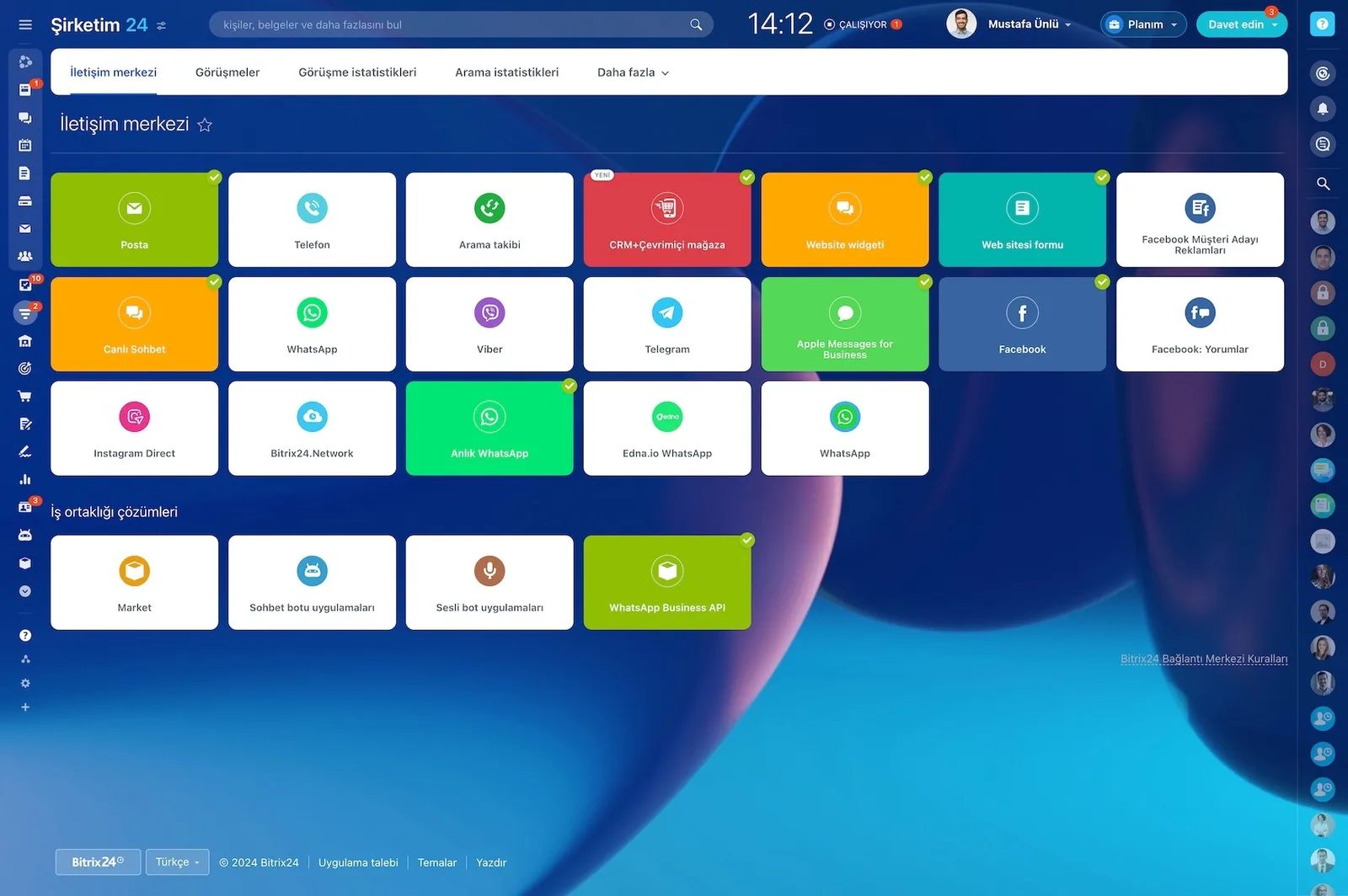
Your customer may arrive by email, phone, web form, live chat, or a messaging app. Your job is to run one and the same process regardless of where the contact started.

We connect every channel to the CRM, so the same robots, the same SLA, and the same reporting apply no matter which door they come through.

  • Email, phone, and web forms merge into a single record stream
  • Live chat and messaging channels feed the same funnel
  • The source tag stays on the record, so the channel breakdown builds itself
  • When the channel changes the history stays put and the conversation continues on the same card
Bitrix24 Contact Center showing mail, telephony, WhatsApp, Telegram, Instagram and Facebook channel cards
CAPABILITIES

What you get

Visual workflow builder

Triggers, robots, conditions, waits and webhooks all sit on one canvas. You design the process without code and edit it from the same screen when things change.

Proven sales playbooks

We build the full chain from ready templates: capture, scoring, assignment, qualification, meeting, quote, objection handling and post-sale handover.

Conditional branching

Flows split by amount, territory, product or customer type. Large opportunities go to senior reps while small requests take the fast lane.

Automated outreach

Email, SMS and WhatsApp messages send from inside the flow. The sequence stops the moment the customer replies and a human takes over.

SLAs and escalation

We set time targets for first response, quote delivery and callbacks. When a target slips, the rep is nudged first and the manager second.

Measurement and tuning

Dashboards show how long each step takes and where deals fall out. When a step clogs, we redesign that part of the flow with you.

BEST FIT

Who is this for?

These are the teams we deploy this module with most often. If your scenario is not listed, let's talk it through anyway.

  • Sales teams handling dozens of inquiries a day who need faster first response
  • Managers who want every rep running the same process the same way
  • SMBs tired of producing quotes and invoices by hand
  • Brands distributing inquiries across dealer or branch networks by rule
  • Companies looking for more capacity without adding headcount

How would this work in your process?

In a free 30-minute call we listen to your workflow and map out how this would run in your company.

Book a free consultation
SETUP

How we roll it out

We handle the setup; you just walk us through your process.

  1. 01

    We clarify your sales pipeline

    We name stages briefly and in action terms: First contact, Qualified, Meeting booked, Quote sent, Negotiation, Won/Lost. Trimming the number of stages improves the accuracy of both the automation and the reports.

  2. 02

    We define SLA targets and assignment rules

    We set measurable targets such as 10 minutes to first response and 48 hours to first quote. Assignment is configured as load-balanced rather than plain round-robin so each rep's capacity counts.

  3. 03

    We run every scenario in a test environment

    We fire each robot against sample records first and review the outgoing email and the created task with you. The risk of a wrong message reaching a customer is closed before go-live.

  4. 04

    We go live and train the team

    We switch the flows on and show your team what the robots do and where they can step in. Over the first few weeks we watch the metrics with you and fine-tune.

Works together with

CRM leads and dealsEmail marketingCloud telephony and call recordingsWeb forms and landing pagesLive chat and website widgetWhatsApp and messaging channelsTasks and projectsCalendar and bookingSales reports and dashboards

Frequently Asked Questions

Do we need a developer to build automations?

No. Robots and triggers are configured in a visual interface. We build the first scenarios around your process, then train your team to adjust them.

What if a robot sends the wrong message to a customer?

We close that risk during implementation. Every scenario runs against sample records first, you approve the output, and only then does it go live.

Can we change a flow later if the process changes?

Yes. Flows are edited from the admin screen and take effect immediately. Larger reworks are covered by your support plan and we can handle them for you.

Does automation replace our sales people?

It replaces the busywork, not the people. Robots log, remind and notify. Pricing, objection handling and the decision to close stay with your team.

Let's configure this around your business

Book a free intro call and we'll walk through your process and show which settings fit you.