Features

Put approvals and internal processes on rails

When approvals run over email and chat, nobody knows where a request is sitting. We turn your internal processes into flows with defined steps, owners and deadlines.

At a glance

  • Drag-and-drop process design
  • Multi-step approval chains
  • Ready HR and admin templates
  • Smart Process Automation
  • Delegation and escalation
THE PROBLEM

An invisible approval chain stalls the work

  • Nobody can say whose desk a request is waiting on.
  • The approval chain scatters across inboxes and two people approve the same thing differently.
  • Time-off and expense forms still circulate on paper or in spreadsheets.
  • The process lives in one person's head and stops entirely when they go on leave.
  • When an audit comes, there's no record of who approved what and when.
THE FIX

How we structure your internal processes

We map your existing approval chain, then define an owner, a deadline and a condition for each step. Requests land with the right person immediately and the full history is logged.

  • Time-off, purchasing, expense, contract and advance requests start from ready form templates.
  • Multi-step chains route to different managers based on amount or department.
  • Each step has a deadline; if it stalls, a reminder fires and a delegate can take over.
  • Completed processes attach automatically to the related task, document or CRM record.
  • Smart Process Automation creates custom record types for work that doesn't fit standard modules.
  • Who approved what, when and with which comment stays in an auditable trail.
Automation rules and triggers laid out stage by stage for a service pipeline

Rules and triggers: the system carries the load

Automation in Bitrix24 has two halves. A rule fires when a record reaches a new status in the pipeline and launches an action such as a task, notification, email, or call, with timing you control.

A trigger does the opposite: an outside event moves the record to the next stage on its own. Set up together, the process stops depending on someone remembering it.

  • Rule: a task, notification, email, or call is created automatically on a stage change
  • Trigger: when the email you sent is opened, the deal advances to the next stage
  • Deal and lead status changes by itself on the condition you define
  • Reminders and notifications reach the right user based on status
Sales automation screen with automation rules and triggers attached to each pipeline stage

Proactive CRM: no micromanagement needed

With Proactive CRM mode switched on, Bitrix24 reminds your people of scheduled, urgent, and unfinished activities and prompts them to act.

Reps learn from the system what to work on first, and managers stop asking the same question every morning. The team learns to prioritize while the follow-up burden on the manager drops.

  • Scheduled, urgent, and unfinished activities are surfaced automatically
  • Reps prioritize their own deals without being chased
  • Managers need far less one-by-one checking
  • A forgotten activity doesn't quietly disappear; it stays on the list
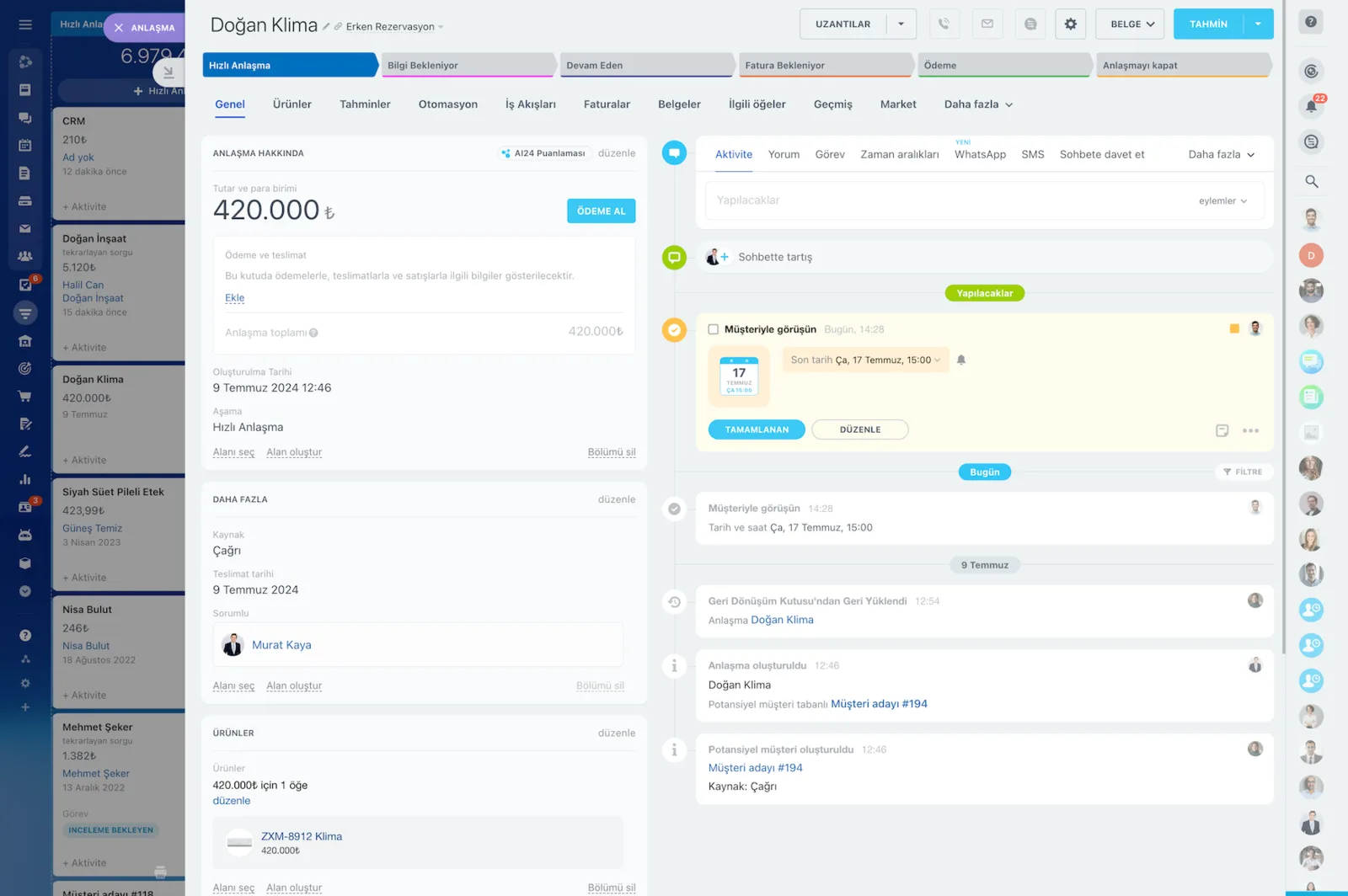
CRM deal card with amount, stage bar and a timeline with activity, WhatsApp and SMS tabs

Multi-step approvals with RPA

Built-in robotic process automation keeps multi-step approvals from scattering across email and chat. Standardized processes such as time-off requests, purchase requests, and expense reporting move step by step in one place.

A request lands on the right desk the moment it's opened, and who approved what and when stays on record.

  • Time-off, purchasing, expense report, and advance requests start from ready-made flows
  • Approval chains route to different managers by amount or department
  • When a process stalls, you can see exactly which step it's waiting on
  • HR-side and CRM-side approvals run on the same logic
Business process designer showing a multi-step workflow built from approval, email and condition steps

Smart process automation for your own record types

Every company has one process that doesn't fit the standard modules. With smart process automation we create new, custom entities inside Bitrix24 that match your needs and automate them with the same rules and triggers.

That one process still running in a spreadsheet finally moves into the system.

  • Custom record types for project approvals, tender tracking, permit processes, and more
  • Each custom entity gets its own stages, fields, and permissions
  • Rules and triggers work on these entities too
  • Reporting and access follow the same logic as the standard modules
Smart Process Automation setup with pipelines, stages, automation rules and workflow options

Automated funnels and sales tunnels

Processes rarely end in one pipeline: sales finishes and delivery begins. Tunnels connect different pipelines, so when a deal reaches a given status in pipeline A (sales), it moves into pipeline B (delivery) and continues its path there.

The record travels with its history and attachments, so the receiving team never loses context.

  • When the sales pipeline hits the defined stage, the record moves to the delivery pipeline
  • Each pipeline gets its own stages, owners, and robots
  • Deal status changes automatically through the trigger you set
  • The end-to-end process stays visible in a single report
Sales pipelines and tunnels screen showing service, insurance and support pipeline stages

Open processes through REST API, Market, and MCP

Your internal processes usually touch other systems somewhere. The Bitrix24 Market offers more than 550 apps and solutions, while the REST API lets you build custom field types, data transfers, and your own reports.

Turn on MCP servers and external AI tools such as ChatGPT can create tasks or find deals inside Bitrix24 in a structured, secure way.

  • More than 550 apps and solutions in the Bitrix24 Market catalog
  • Custom field types, data transfer, and custom reports through the REST API
  • Ready-made integrations with telephony and SMS providers
  • MCP settings grant external AI tools secure access to your workspace
MCP servers settings screen and a mobile view of an external AI app connected to a Bitrix24 task
CAPABILITIES

What you get

Drag-and-drop process design

Steps, conditions and approvers are laid out in a visual designer. Adding a new rule doesn't mean filing a ticket with IT.

Multi-step approval chains

Sequential, parallel or conditional approvals are all supported. Requests above a threshold escalate to senior management on their own.

Ready HR and admin templates

We enable prebuilt flows for the common ones during setup: time-off, purchasing, expense reports, advances and asset assignment.

Smart Process Automation

For work that doesn't fit the standard modules we build your own record type; project approval, tender tracking, permit processes, whatever you run.

Delegation and escalation

If an approver is away or overloaded, the request moves to their delegate. Stalled steps alert the manager so nothing locks up.

Audit trail and reporting

Reports show average completion time, the slowest step and workload per person. You find the bottleneck from data instead of guessing.

BEST FIT

Who is this for?

These are the teams we deploy this module with most often. If your scenario is not listed, let's talk it through anyway.

  • Mid-sized companies with multi-step purchasing and spend approvals
  • HR departments digitizing time-off, advance and asset workflows
  • Legal and finance teams that need contract approvals to be traceable
  • Multi-branch operations that want one standard process everywhere
  • Manufacturers and service firms required to keep process records for audits

How would this work in your process?

In a free 30-minute call we listen to your workflow and map out how this would run in your company.

Book a free consultation
SETUP

How we roll it out

We handle the setup; you just walk us through your process.

  1. 01

    We map your process inventory together

    In a workshop we lay out how many steps each approval takes, whose sign-off is genuinely required, and how long it currently runs. We usually recommend starting with the three or four processes that cause the most friction.

  2. 02

    We design the flow and define permissions

    We build the steps, conditions, approvers, and time targets in the visual designer. Deputy and escalation rules are set here too, so the process never locks up when an approver is away.

  3. 03

    We pilot with one department

    We run the flow in a single department first and test it with real requests. Steps that turn out to be redundant get trimmed, and the forms reach their final shape from that feedback.

  4. 04

    We roll out and train the team

    We open the flows to the whole company and train people on raising and approving requests on both desktop and mobile. Then we watch cycle times in the reports and clear bottlenecks with you.

Works together with

CRM deals and leadsTasks and projectsDocument management and DriveCalendarHR modules and time-off managementE-signatureREST APIBitrix24 Market (550+ apps)MCP serversTelephony and SMS providers

Frequently Asked Questions

Can you move our existing approval rules into the system?

Yes. In a pre-implementation workshop we map your current chain step by step, simplify what's redundant and rebuild the rest in Bitrix24 as it actually runs.

Can approvals be given from a phone?

They can. The Bitrix24 mobile app sends the notification and the manager approves or rejects with one tap. This is how most field-heavy teams use it.

How many different workflows can we run?

There's no practical limit. We usually recommend starting with the three or four processes that cause the most friction, then adding more as the team settles in.

Is there a retroactive audit record?

Yes. Every step records who completed it, when and with which comment. That log can be exported for audit and internal control requests.

Let's configure this around your business

Book a free intro call and we'll walk through your process and show which settings fit you.