Features

Put AI inside your chat, your CRM and your meetings

CoPilot is not a separate app. It lives inside Bitrix24 chat, CRM records and video calls, so your team gets back the hours it spends typing, listening and taking notes.

At a glance

  • Assistant inside chat
  • Call and meeting transcripts
  • Automatic CRM field filling
  • Meeting summary and suggestions
  • Sales and marketing copy
THE PROBLEM

Most of the time goes to recording work, not doing it

  • A rep finishes a 35-minute call, then sits down to write notes; and most of the detail is already gone.
  • CRM fields stay half empty because filling them by hand takes too long, so reports come out incomplete.
  • Every proposal paragraph, campaign headline and internal announcement starts from a blank page.
  • Whoever missed the meeting has nobody to ask, and the recording sits there as a one-hour video.
  • AI tools get used outside the company in separate tabs, and customer data ends up where nobody tracks it.
THE FIX

We wire CoPilot into your actual context

We set CoPilot up as an assistant working on your data, not as an empty prompt box: which team uses it in which scenario, which fields fill automatically, and which output needs review before it counts.

  • CoPilot in chat: announcements, reply drafts, summaries and translations in seconds, with the thread's context kept.
  • Call transcription: phone conversations become readable text and attach to the CRM record.
  • Auto-filled fields: name, phone and company are extracted from the conversation into the lead or deal card.
  • CoPilot follow-up on video calls: agenda, outcomes and a timestamped transcript.
  • Suggested actions convert to tasks in one click, so a meeting produces assigned work, not just talk.
  • Marketing copy: email campaign and landing page text generated from the audience you describe.
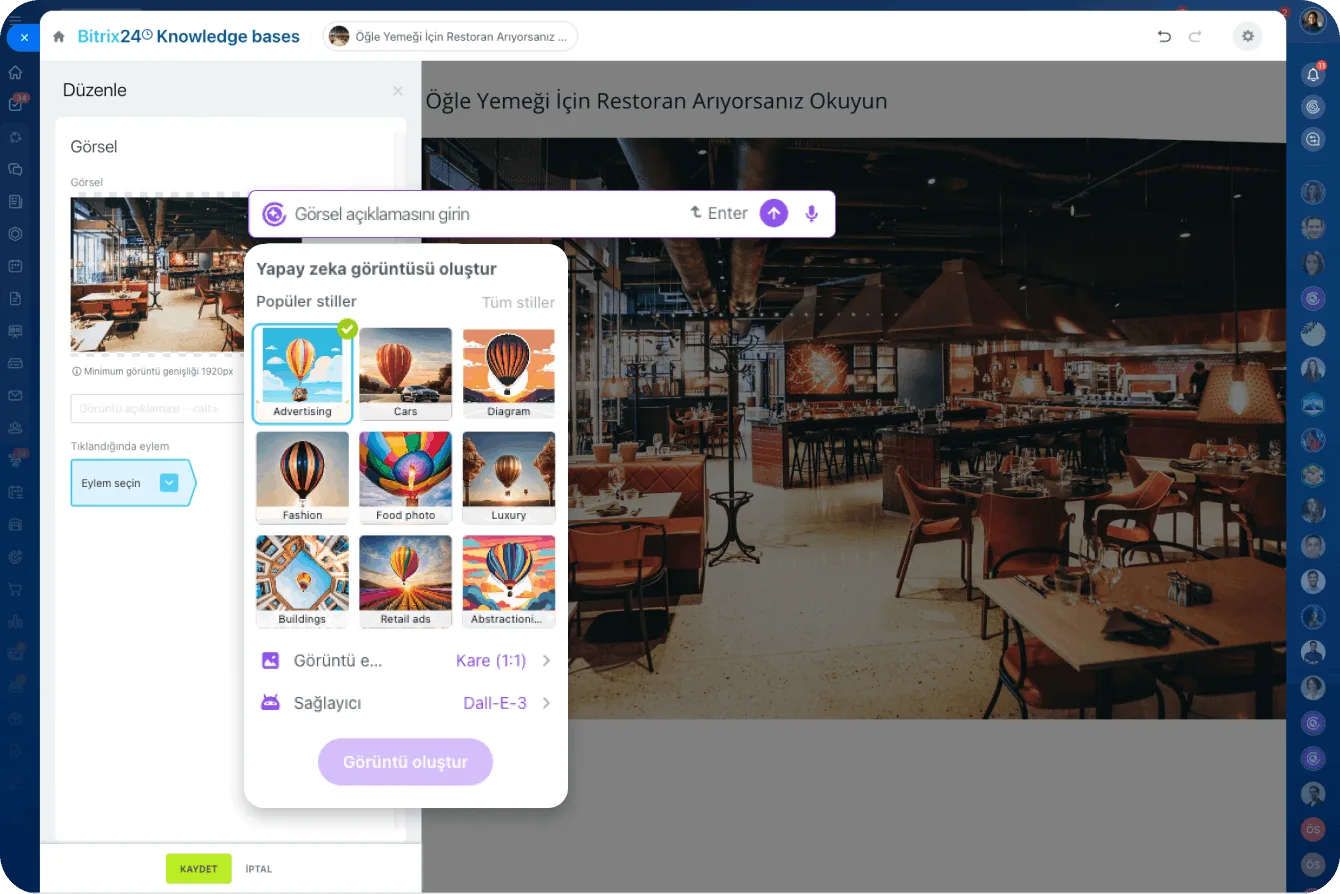
AI image generation panel inside the knowledge base article editor, with style presets and the DALL·E provider

CoPilot in chat: from idea to finished copy

Open a new CoPilot thread in Bitrix24 chat, describe what you want in a detailed prompt, and an idea, draft or summary comes back in seconds.

Because CoPilot remembers the context of the conversation, you can ask it to expand the previous result, change the tone or shorten it. You keep iterating in the same dialog until you are happy with the output.

  • Condenses a long text into a short summary, checks grammar and translates.
  • Expands the previous answer, rewrites it in a different tone or adds an unexpected twist.
  • Doubles as a sounding board: ask for constructive criticism and logic checks on your own idea.
  • Image generation runs in the same thread, so nobody switches to another tool.
CoPilot chat panel generating marketing ideas in conversation

CoPilot Follow-Up on video calls

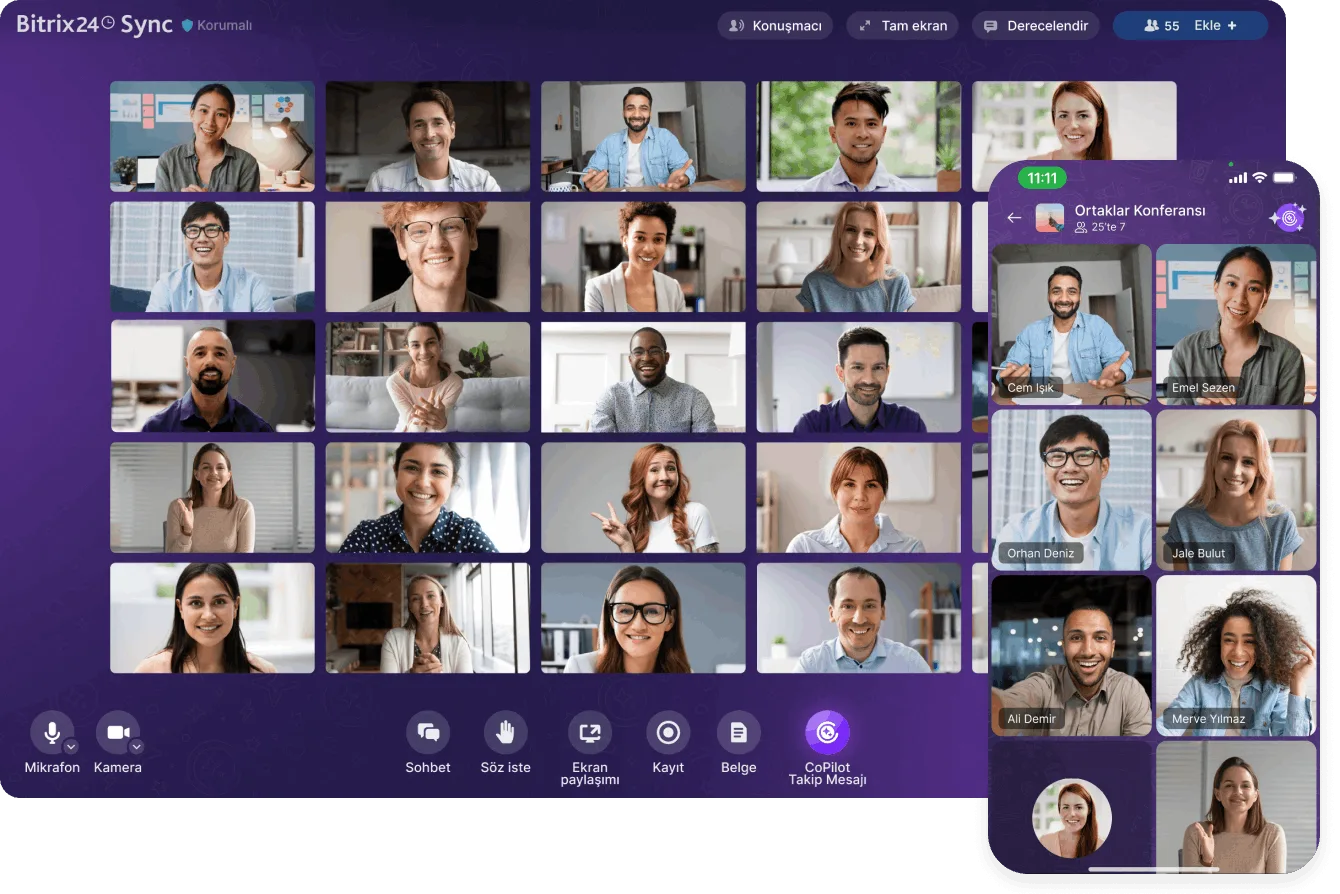
Start the Follow-Up tool during a video call and CoPilot transcribes the conversation, then runs its own neutral analysis.

You end up with a word-for-word transcript, timestamps and a detailed call summary. The summary covers the agenda, key outcomes, suggested follow-up actions and an assessment of the call itself.

  • A word-for-word transcript is produced along with timestamps.
  • Suggested follow-up actions convert into tasks with a single click.
  • The call assessment and improvement suggestions ship inside the same report.
  • Anyone who missed the meeting catches up without replaying the recording.
  • You also get specific suggestions on what to change to lift team productivity.
Bitrix24 Sync conference with the CoPilot Follow-Up button and the mobile participant view

CoPilot in CRM: transcription and auto-filled fields

Instead of replaying a 35-minute customer call, you read CoPilot's readable transcript. CoPilot does more than transcribe: it fills the matching fields; name, phone number, company; on the lead and deal card automatically.

The same assistant writes promotional email copy, landing page text and campaign concepts.

  • Phone conversations are converted into readable text.
  • Name, phone and company are pulled from the conversation into the CRM record.
  • Quality copy is generated for email marketing and landing pages.
  • Define your goal and audience, and CoPilot produces the campaign idea.
CoPilot transcribing a phone call and filling in the deal fields from it

CoPilot in Tasks and Feed

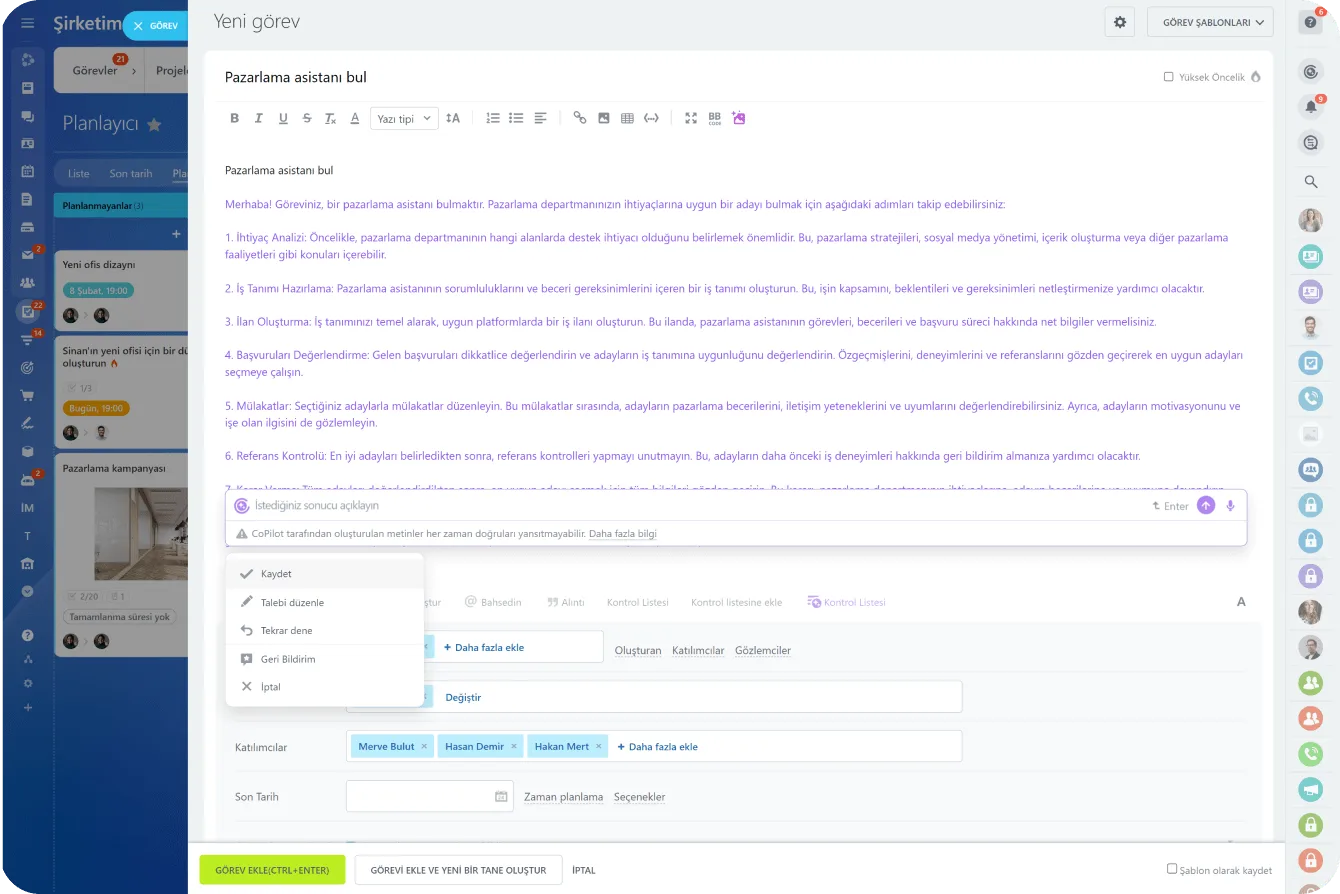
When you create a task, a short summary is enough: CoPilot fills in the details and adds an optional checklist.

It can break a long task description into steps and turn them into a checklist, so you can assign an owner to each step. In the Feed it writes announcements, replies to comments, translates and checks grammar.

  • Task description and checklist are prepared from a single prompt.
  • Ask for a task summary instead of reading every comment underneath it.
  • A built-in CoPilot menu sits inside Feed posts and comments.
  • It is one click away while you type, or a tap of the space bar.
  • It drafts praise or constructive criticism for other people's posts.
CoPilot writing the task description while a new task is created

CoPilot in Sites and Stores

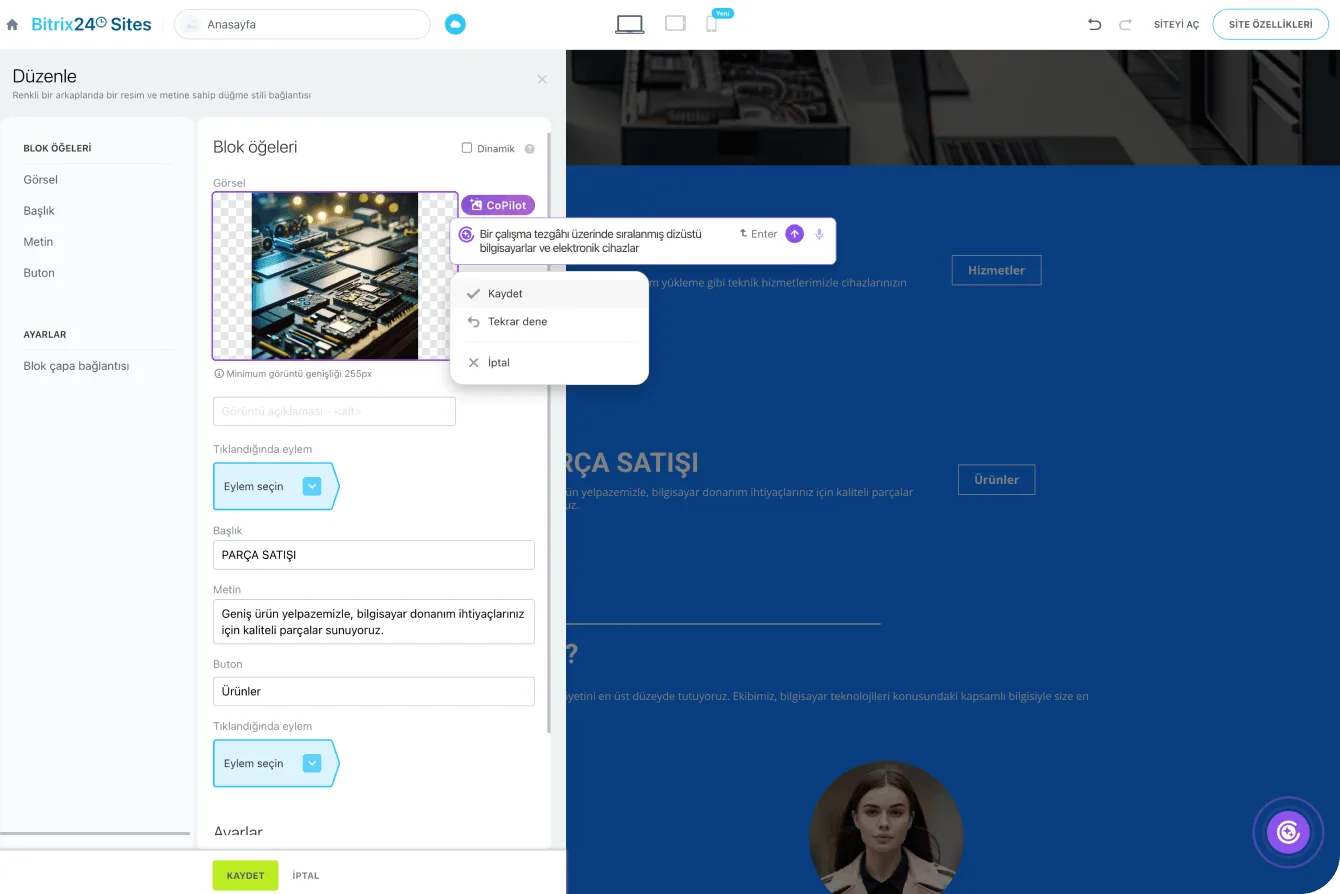
Inside the Bitrix24 site and store builder, CoPilot produces copy, images and even an entire page.

You enter the topic and the tone; formal, engaging, informative; and the assistant handles the rest. A single prompt can return a website with a design, texts, images and web forms in minutes.

  • Ask for the text to be rewritten from a different angle or in a different tone.
  • The more specific your prompt, the more on-target the generated image.
  • One prompt returns a site draft with design, copy, visuals and forms.
  • Product descriptions and campaign copy are written inside the store itself.
Generating an image and text with CoPilot inside the Bitrix24.Sites editor

Privacy, data control and MCP

The algorithm behind CoPilot does not store your data on third-party servers or use it for training, and the content is deleted from the provider's servers once you close the dialog.

You can also clear prompts and answers manually from the chat menu. On top of that, MCP lets you connect external AI tools such as ChatGPT to your portal.

  • Data is removed from the provider's server as soon as the dialog is closed.
  • Prompt and answer history can be cleared manually from the chat menu.
  • MCP (Model Context Protocol) gives external AI tools a structured, secure path in.
  • A connected AI tool can read data, create tasks and look up deals.
  • The connection is enabled from the MCP Servers section in portal settings.
MCP servers settings screen and a mobile view of an external AI app connected to a Bitrix24 task
CAPABILITIES

What you get

Assistant inside chat

Open a chat, describe what you need, and CoPilot expands, rewrites or shortens its previous answer. You keep iterating in the same thread until the result works.

Call and meeting transcripts

Phone calls and video meetings are transcribed. Instead of replaying an hour of audio, you read the summary and jump to the exact moment via timestamps.

Automatic CRM field filling

CoPilot pulls names, phone numbers and company details out of the conversation and writes them into the right fields. Complete records make reporting trustworthy.

Meeting summary and suggestions

The follow-up tool lists the agenda, decisions taken and recommended next steps, along with specific suggestions for running better calls.

Sales and marketing copy

Campaign ideas, email bodies, landing page headlines and proposal blurbs appear as soon as you describe the goal and the audience. No blank page.

Brainstorming partner

Ask CoPilot to pressure-test your idea: request constructive criticism, look for logical gaps, generate an alternative angle. A cheap second opinion before you commit.

BEST FIT

Who is this for?

These are the teams we deploy this module with most often. If your scenario is not listed, let's talk it through anyway.

  • Sales teams making dozens of calls a day with no time left for notes
  • Project and account teams that struggle to turn meeting outcomes into tasks
  • Marketing groups producing a constant stream of campaign copy and announcements
  • Support teams that need fast, consistent replies in a shared tone of voice
  • Managers who want AI usage consolidated inside one controlled platform

How would this work in your process?

In a free 30-minute call we listen to your workflow and map out how this would run in your company.

Book a free consultation
SETUP

How we roll it out

We handle the setup; you just walk us through your process.

  1. 01

    Scenario workshop

    We decide which team uses CoPilot for what: call summaries, proposal copy or task descriptions. We do not configure anything until the scenarios are clear.

  2. 02

    Enablement and permissions

    We switch CoPilot on in your portal and use access permissions to decide who can reach it. If you need it, we also set up the external AI connection under MCP Servers.

  3. 03

    CRM and telephony wiring

    We prepare the telephony integration and CRM field structure so transcription and auto-fill actually work. We pick together which fields are allowed to fill automatically.

  4. 04

    Prompt library

    We build prompt templates from your team's real work, so people start from a proven prompt instead of an empty box.

  5. 05

    Training and quality review

    We train the users and review output quality together in the first weeks. Critical fields get an approval step so bad data never slips into CRM unnoticed.

Works together with

Bitrix24 Chat and FeedCRM: leads, deals and activitiesBitrix24 Telephony and call recordingsVideo calls and meetingsTasks and projectsSites and Online StoreEmail marketing and landing pagesExternal AI tools via MCP

Frequently Asked Questions

Does CoPilot work in Turkish?

It does. You can prompt in Turkish, generate Turkish copy and transcribe Turkish conversations. During setup we test it against your real scenarios and prepare the prompt templates that actually produce useful output for your team.

Is our customer data used to train the AI model?

CoPilot runs as part of the Bitrix24 platform: it processes the request and returns the result to your portal. We also use access permissions to limit which teams can use CoPilot on which data, and keep sensitive fields out of scope.

Is CoPilot included in every Bitrix24 plan?

CoPilot is available with different usage allowances depending on the plan. We look at your team size and monthly call volume and tell you plainly which plan is enough; we do not push you to a higher tier you will not use.

Is transcription accurate enough to rely on?

With decent audio it is more than enough for summaries and field filling. Still, treat the output as a draft rather than a record of truth. For critical fields we add an approval step so bad data never lands in the CRM unnoticed.

Let's configure this around your business

Book a free intro call and we'll walk through your process and show which settings fit you.