Features

Run your storefront, your stock and your orders in one place

The Bitrix24 store is not a separate e-commerce package. It is a sales channel inside the CRM: every item added to a cart becomes a deal, every order becomes a stock movement.

At a glance

  • Template-based store builder
  • Product catalog
  • Multi-warehouse inventory
  • Full CRM integration
  • Selling through payment links
THE PROBLEM

The store is in one system, the selling in another

  • The shop runs separately from the CRM, so sales reps cannot see a customer's order history.
  • Stock lives in a spreadsheet, sold items are never deducted, and you end up selling what you do not have.
  • You run several warehouses but cannot see quantity by product and location on one screen.
  • When an order lands, who packs it and who invoices it is unclear, so the process runs over chat.
  • Abandoned carts, repeat purchases and average order value are never reported at all.
THE FIX

We set the store up as a CRM channel

We launch the storefront from a template, import your catalog, model your warehouses and automate the path from order to payment. Your team works on a single screen.

  • Pick one of the ready-made store templates and adapt it to your brand; no code involved.
  • The product catalog is built with categories, subcategories, units, images and custom fields.
  • Every order and customer, with contact details, flows automatically into the CRM.
  • When a sale closes, stock balances update themselves and restocking needs become visible.
  • Pick a product, generate a payment link, send it to the customer; they receive a payment document.
  • Access levels are set per employee: who can add products, apply discounts or change prices.
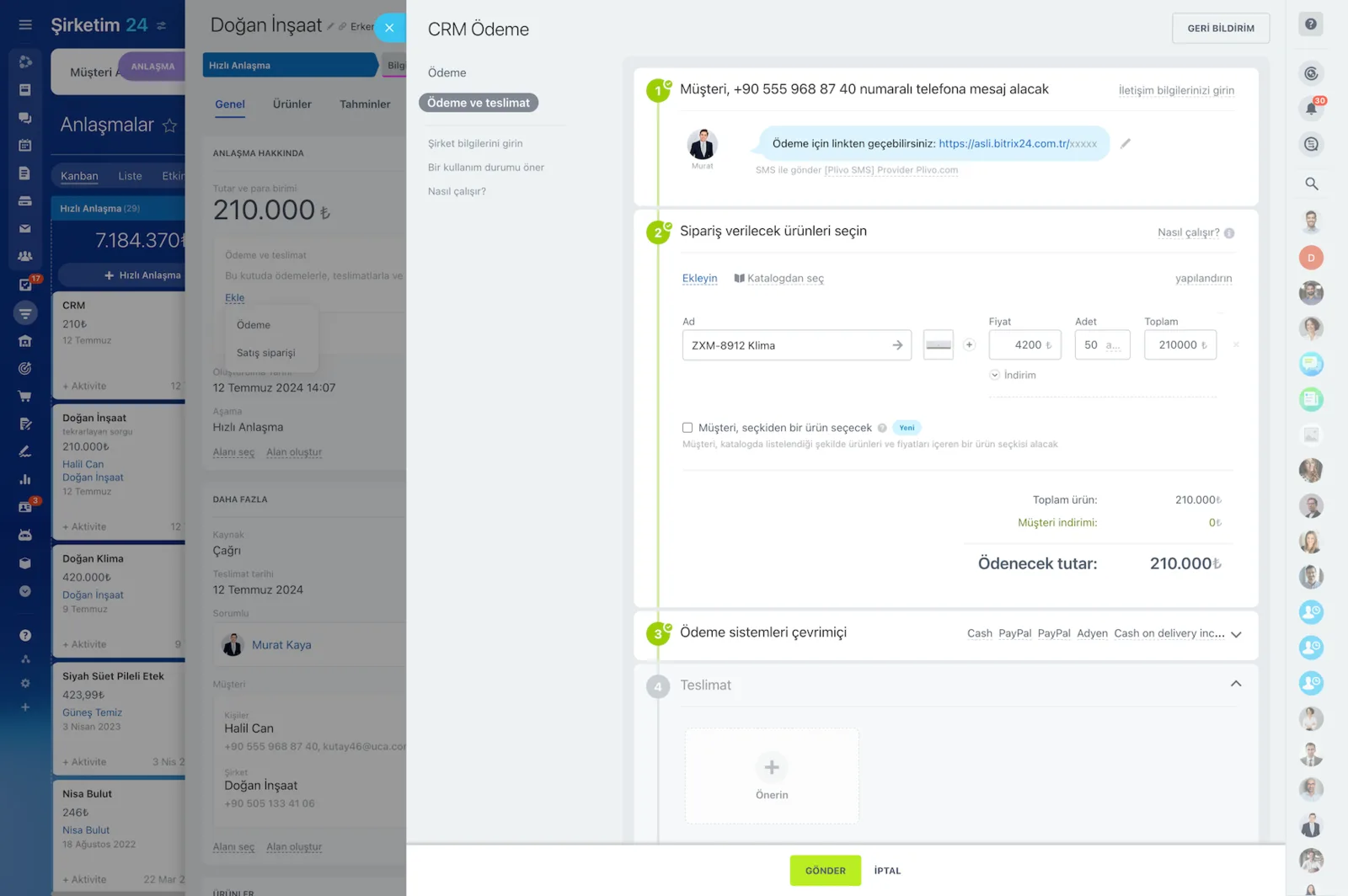
CRM Payment wizard covering the payment link, product selection, payment systems and delivery steps

Drag-and-drop store builder

Bitrix24's drag-and-drop builder lets you design and publish your own online store. A large set of user-friendly e-store templates ships ready to use; you rearrange blocks and adapt the design to your brand.

Every store you build comes with product catalog, order management and inventory tools attached.

  • Start from ready-made e-store templates with no code involved.
  • Catalog, order and inventory tools ship together with the store.
  • The store, CRM and online payments live in the same portal.
  • Responsive layouts keep the storefront correct on phones.
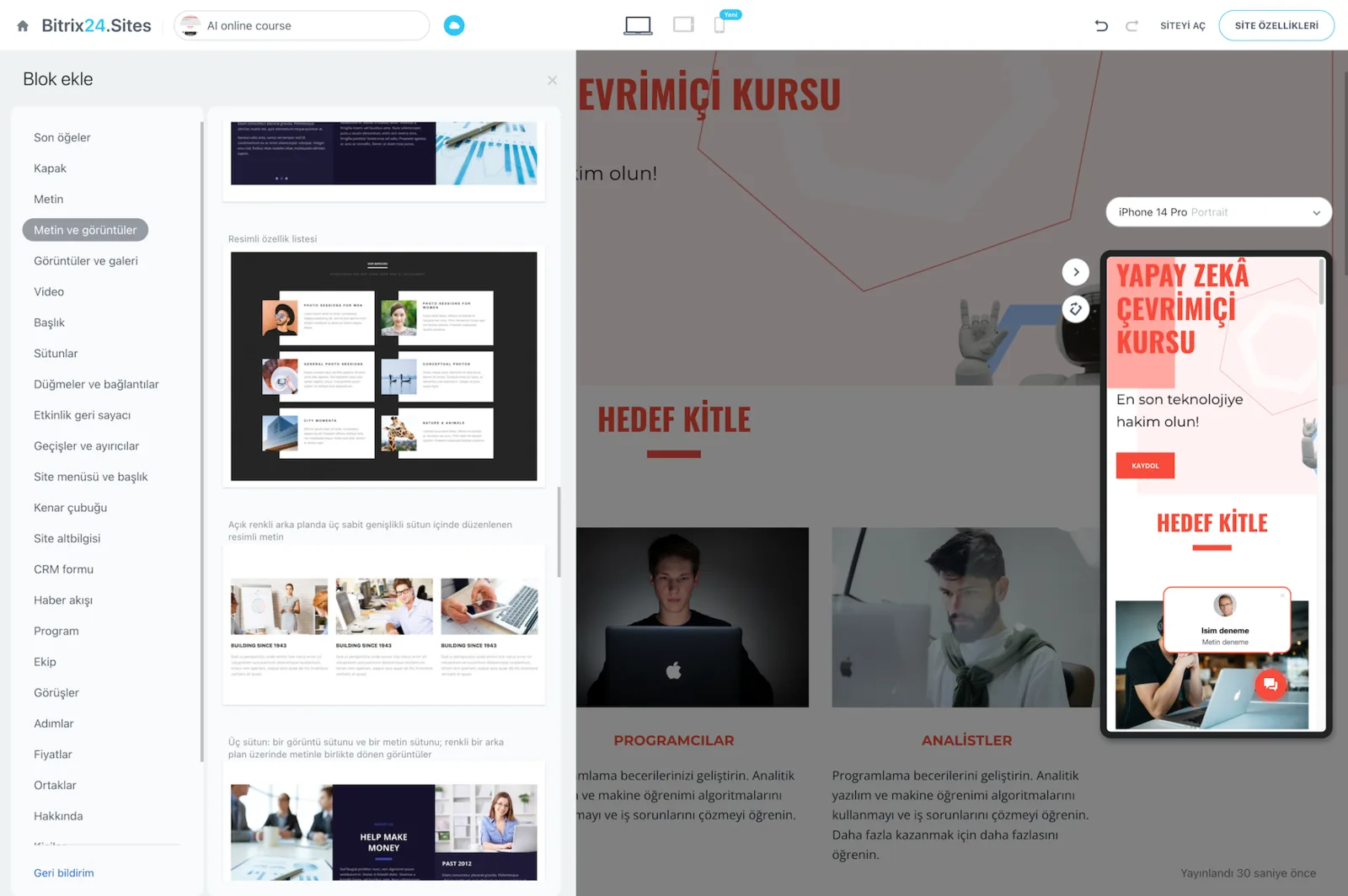
Bitrix24.Sites editor with the block library and desktop and mobile previews of the page

Product catalog and custom fields

The catalog is not only about products: there is a separate service entity for service-based businesses.

You add products in one click, build categories and subcategories, and import from an existing catalog. Alongside units of measure, discount prices, images and video, you add custom fields of your own.

  • Category and subcategory trees go as deep as you need.
  • Bulk import brings your existing catalog across.
  • Units of measure, discount price, images and video are all defined per item.
  • Business-specific fields such as size, weight or trim level are added freely.
  • Products and services are managed as separate entities.
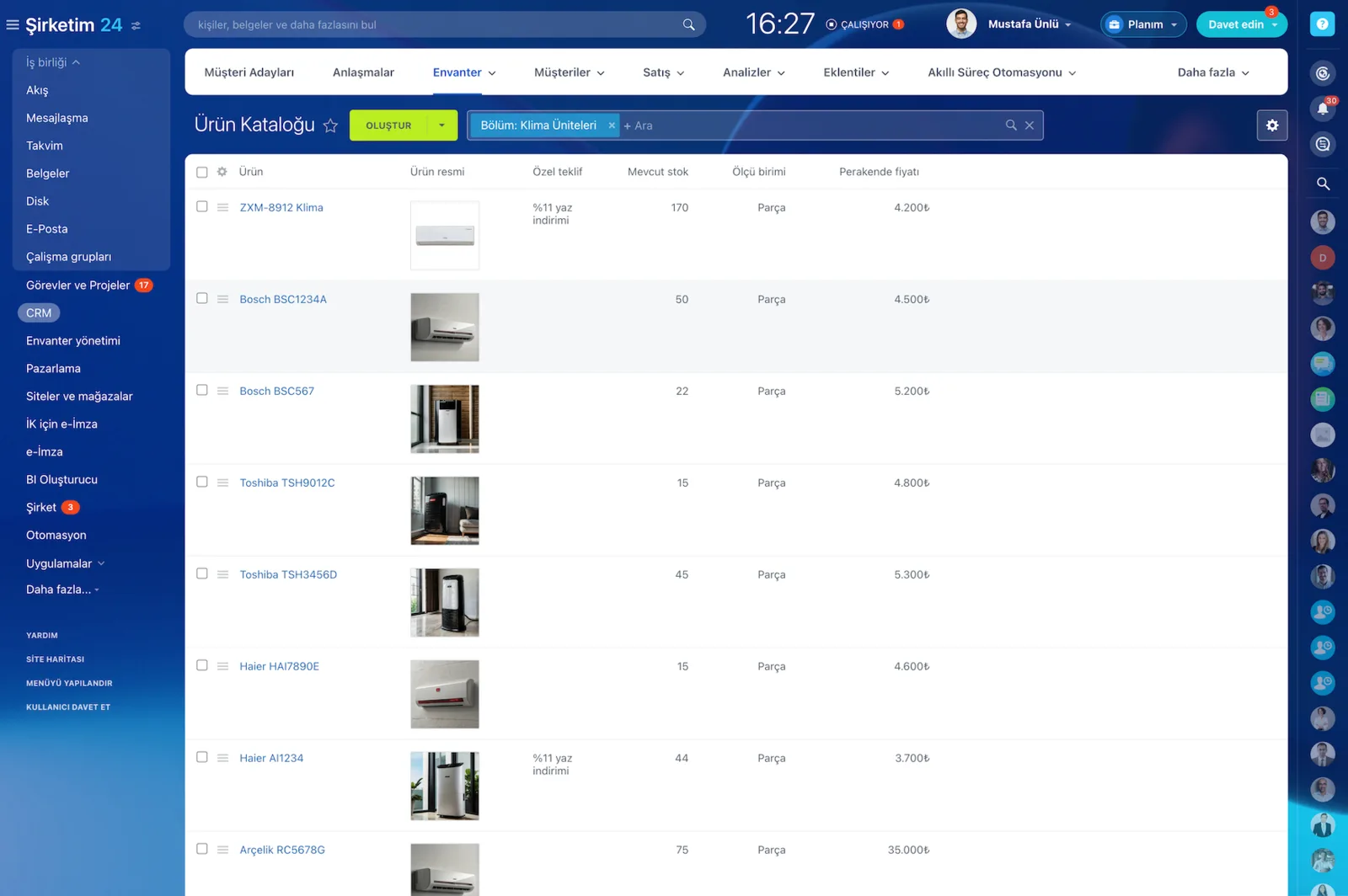
Product Catalog screen with product images, stock quantity, unit of measure and retail price

Multi-warehouse inventory management

Track, audit and manage stock across multiple warehouses from a single screen. Every item in your catalog is accounted for and traceable from supplier to customer.

Once a product is sold and the deal closes, the system updates your stock balance automatically.

  • Stock receipts, sales orders, write-offs, transfers and audits are processed in the system.
  • Transfers between warehouses are recorded rather than remembered.
  • How much sold and whether you need to restock is visible at any moment.
  • Inventory is integrated with the online store, CRM and product catalog.
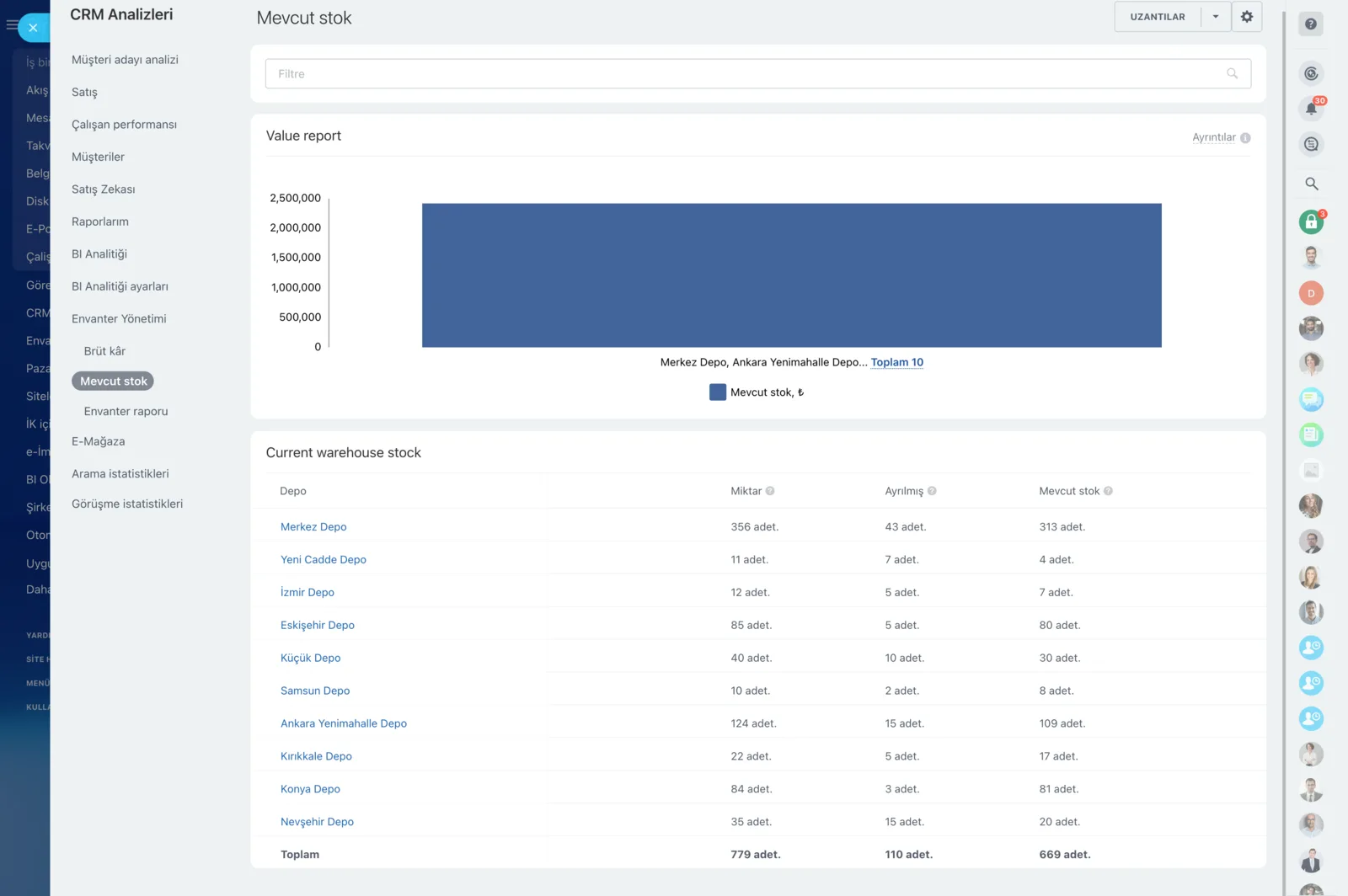
CRM analytics showing a per-warehouse stock chart and table

Orders integrated with CRM

All orders and customers, contact details included, are added to your CRM automatically.

Every product a customer puts in the cart turns into a deal in CRM, and you take payment straight from there. Sales sees conversation history, orders and payments on the same record.

  • Orders and customer records land in CRM without manual copying.
  • Cart contents become deal line items, feeding quotes and invoices.
  • Payment links are generated from inside the deal.
  • A customer's full order history accumulates on one card.
CRM Deals Kanban board with deal cards arranged by stage and per-stage totals

Role-based store permissions

Set the access level for each employee and decide which actions are available to them.

Creating products, applying discounts, editing stock receipts and managing prices are all controlled separately. That keeps a larger team from breaking price and stock discipline.

  • Product creation and discount rights are separated.
  • Who may edit inventory documents is defined explicitly.
  • Price management stays open only for authorized roles.
  • Permission changes are made from the admin screen without code.
Access Permissions screen assigning full access, limited access or administrator roles to users and groups
CAPABILITIES

What you get

Template-based store builder

Start from a clean, user-friendly store template, rearrange the blocks and publish. Every store ships with catalog, order and inventory tools included.

Product catalog

Add products in one click, build categories and subcategories, import from an existing catalog. Separate products from services and add your own fields like size or weight.

Multi-warehouse inventory

Track stock across several warehouses on one screen. Process receipts, sales orders, write-offs, transfers between locations and stock counts as documents in the system.

Full CRM integration

An item added to a cart becomes a deal in the CRM. The customer's order history, conversations and payments all stay on the same record.

Selling through payment links

Customers can buy without visiting the site: pick the product from the catalog and send the payment link in chat. You get the confirmation, they get the document.

Role-based store permissions

We define what each employee may do; create products, apply discounts, edit stock documents or manage pricing; as separate, individually controlled permissions.

BEST FIT

Who is this for?

These are the teams we deploy this module with most often. If your scenario is not listed, let's talk it through anyway.

  • Brands selling both through a storefront and through reps who need one shared stock figure
  • Wholesale and retail businesses operating several warehouses or branches
  • Teams that close social media inquiries by sending a payment link
  • Distributors managing B2B price lists and customer-specific discounts
  • Companies tired of copying data between a separate e-commerce platform and their CRM

How would this work in your process?

In a free 30-minute call we listen to your workflow and map out how this would run in your company.

Book a free consultation
SETUP

How we roll it out

We handle the setup; you just walk us through your process.

  1. 01

    Catalog and warehouse inventory

    We map out your products, services, categories and custom fields, then confirm how many warehouses you run and what the opening stock balances are.

  2. 02

    Store setup

    We pick a suitable e-store template, adapt it to your brand and build the category tree and storefront layout. Domain and SSL are on us.

  3. 03

    Catalog import

    We import your Excel or CSV file with a field mapping. A small sample runs first so we can verify the result together before the full import.

  4. 04

    Payment and order flow

    We connect payment methods and define the path from order to payment and delivery with automation rules, then set role permissions and train the team.

Works together with

Bitrix24 CRM and sales pipelinesProduct catalog and service entityInventory and warehouse managementOnline payments and payment linksSite builder and landing pagesContact Center and social sellingBitrix24 Market applications

Frequently Asked Questions

Do we have to move our existing online store to Bitrix24?

No. Your site can stay where it is; we push orders and customers into Bitrix24 CRM through the REST API or webhooks. Your storefront stays yours while sales work and reporting consolidate in Bitrix24.

How do you import our product catalog?

We map your Excel or CSV export field by field: product name, code, price, currency, unit, category and any custom fields. We run a small sample import first and review the result together before loading everything.

Can stock be held in more than one warehouse?

Yes. We define your warehouses and expose per-location balances for each product. Transfers, goods receipts and stock counts are processed as documents, and balances drop automatically when a sale closes.

Are Turkish payment providers supported?

For common virtual POS and payment providers we use Bitrix24 Market apps or an API integration. During the call we ask which bank and provider you work with and tell you exactly which route fits.

Let's configure this around your business

Book a free intro call and we'll walk through your process and show which settings fit you.