
Describe what you need, have the app ready the same afternoon
Vibecode is an AI-powered development platform that builds custom apps, bots and automations for Bitrix24. You do not write code; you describe what you want. What comes out runs against the real data in your portal.
Implementation, the pilot app and team training come from us as a Gold Partner.
You write
I want to see who on my team closed the most deals this month. Show the amount and the number of closed deals per representative.
Vibecode
I am building a dashboard that reads deals from the CRM and groups them by representative. Connecting to your Bitrix24 portal requires CRM read permission.
- 40
- ready-made templates
- 800+
- API endpoints
- 35+
- bot platform endpoints
- Hours
- not weeks
Three steps, one conversation
It starts with a conversation and changes with one too. No brief to write, no quotes to collect, no waiting.
- 1
Describe the idea
Write what you want to see or do in everyday language. No technical terms needed.
- 2
Let the AI build it
The app is built and connected to the right Bitrix24 tools, asking permission when it needs data.
- 3
Review and publish
Try the result, ask for corrections in plain language and open it to the team. One more sentence changes it later.
Not one kind of app
Several kinds of tool can be built against your portal.
Business apps and dashboards
Dashboards that read and summarise your CRM data, scoring screens and decision tools. You describe the layout too.
Chat bots
Bots that run inside Bitrix24 chat. The bot platform exposes more than 35 endpoints.
AI agents
Agents that work with your portal data in an isolated environment. The open-source Hermes agent can also be used.
Automations
Flows that take over repetitive work such as approvals, classification and routing.
Ready-made templates
Forty ready-made solutions that launch in minutes and adapt to your process.
A closed server
Apps are hosted on a server closed to the internet; management runs over REST API rather than SSH.
What actually comes out?
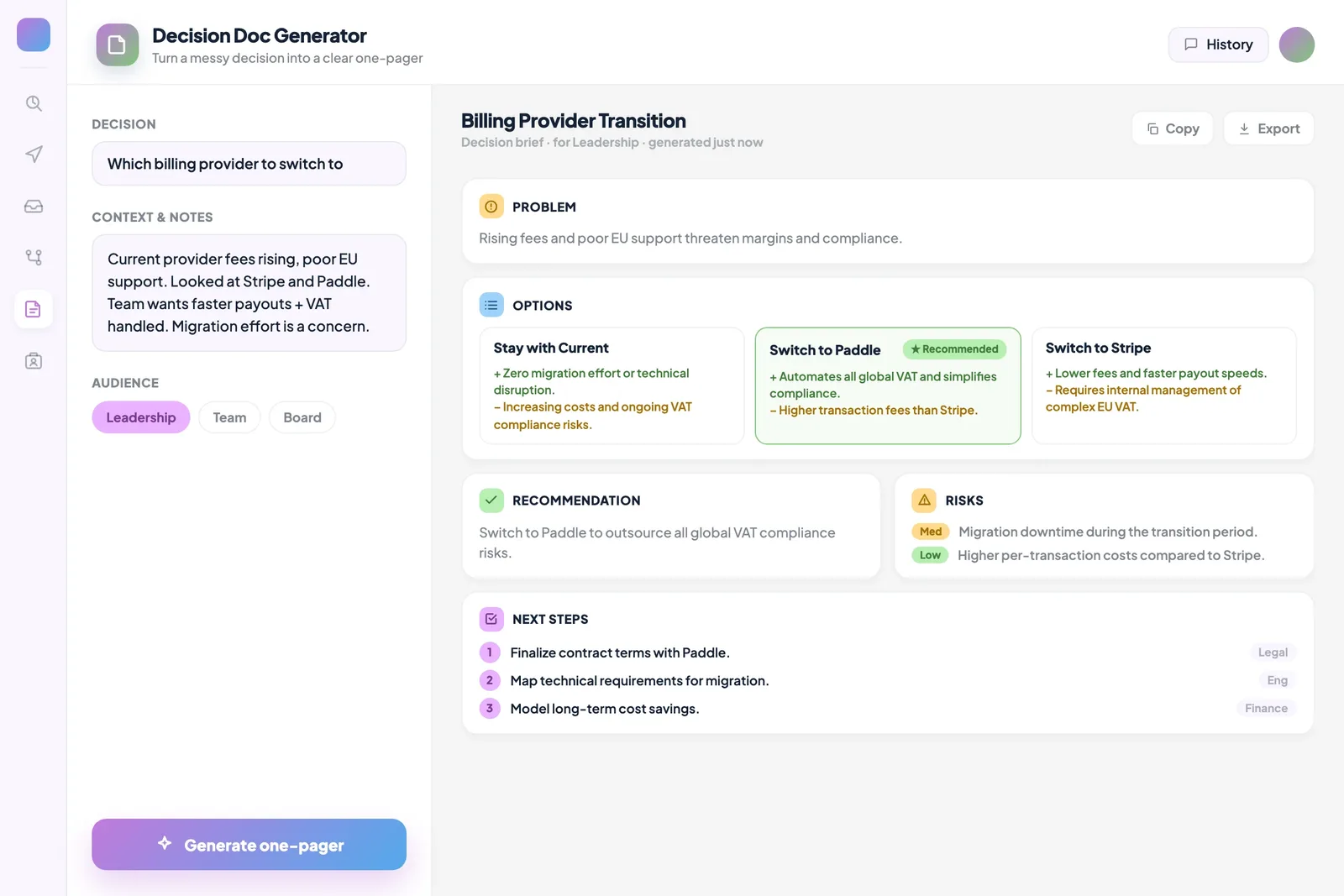
The template library shows what is produced rather than promising in the abstract. These come from Bitrix24's own prompt library.
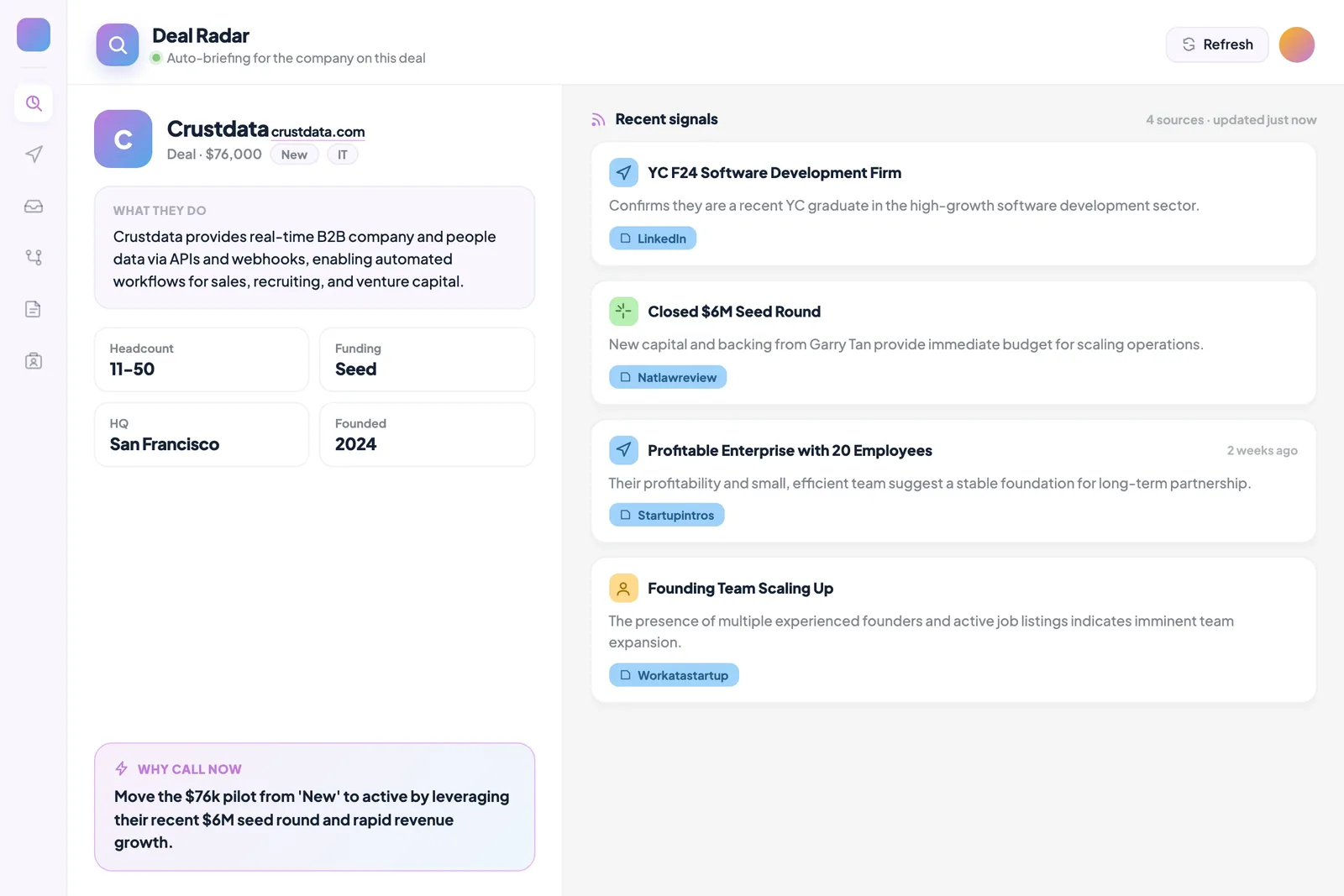
Deal Radar
Brings the customer's company profile and recent developments with sources, and adds a short "why reach out now" assessment.
Daily CRM Digest
Four columns each morning: closing this week, going quiet, waiting on you, and new leads that arrived overnight.
Lead Scoring Board
Classifies open deals as hot, warm or cold, with the score calculated in code from CRM signals.
Stalled Task Monitor
Ranks stuck work by the risk of being forgotten and suggests exactly one next step per row.
Meeting to Tasks
Turns meeting notes into action items, taking only the dates and owners explicitly stated in the text rather than guessing.
Project Breakdown
Splits a goal into stages and tasks with estimates and dependencies, then pushes them to Bitrix24 tasks.
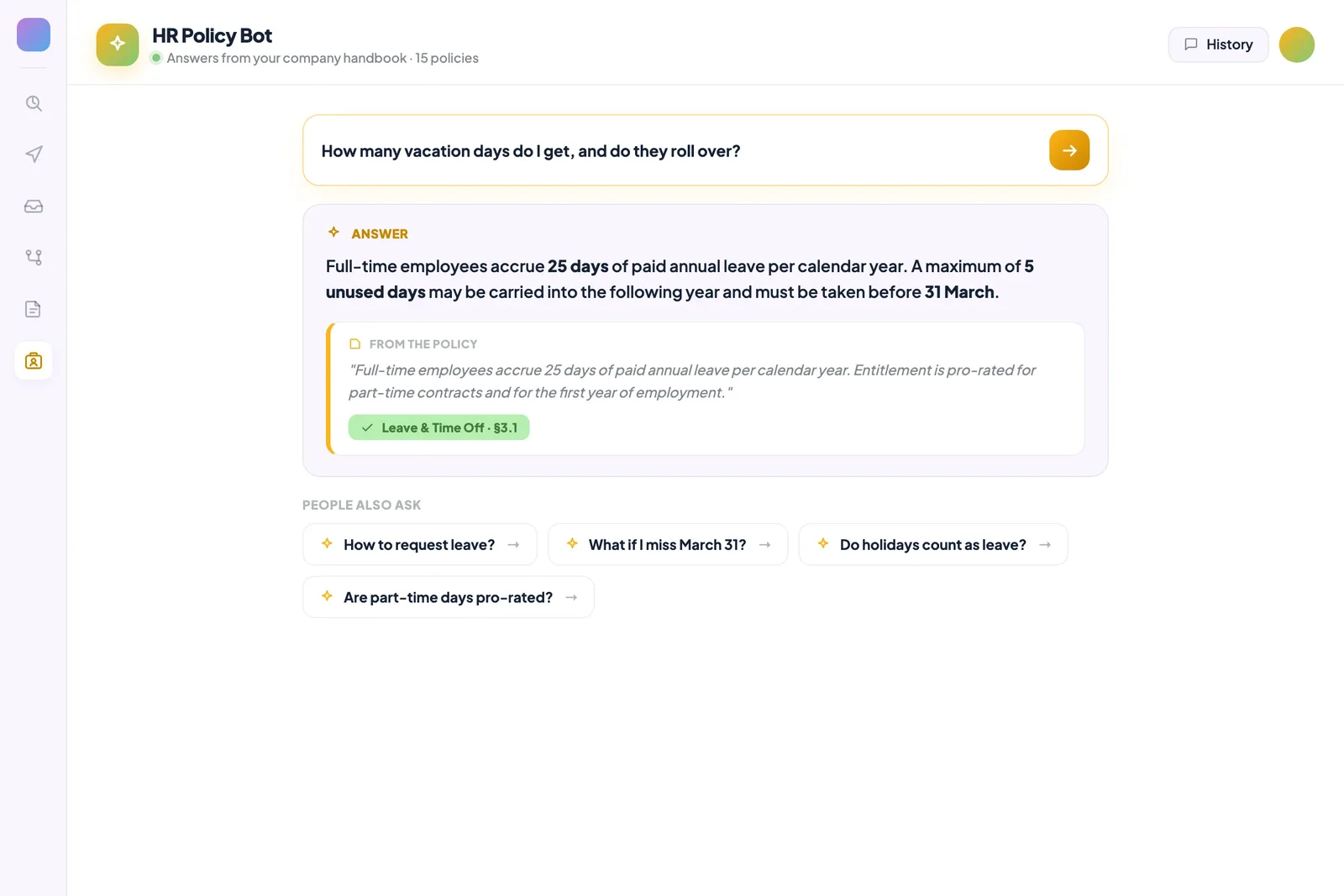
HR Policy Bot
Answers employee questions from the company handbook, showing the exact quote and section, and says so when a topic is not covered.
Team Leave Board
Shows who is away on a two-week timeline and lets people request leave.
Onboarding Tracker
Tracks a new hire's checklist across four categories and flags overdue steps.
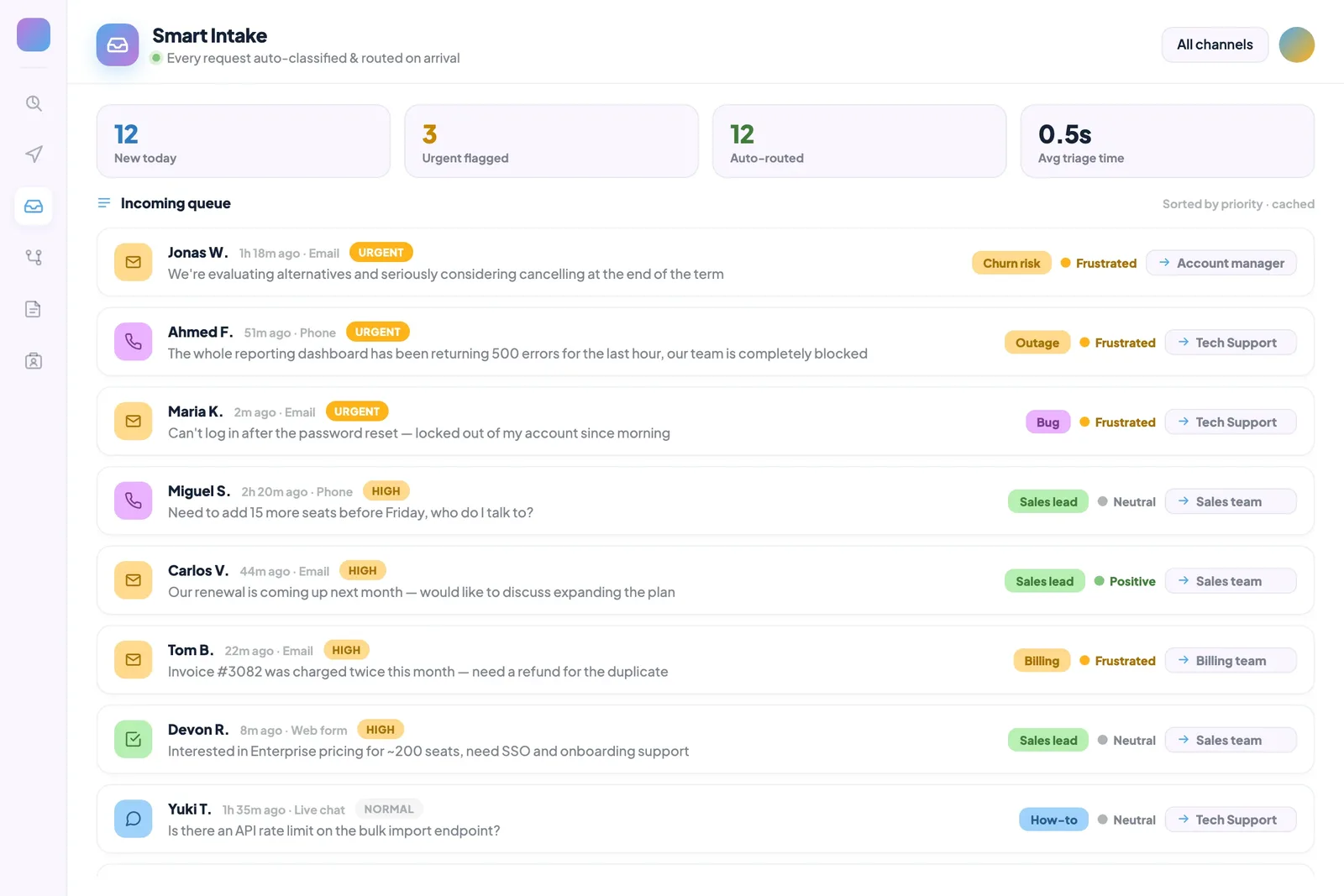
Smart Intake
Classifies incoming requests by topic, sentiment and urgency, then routes them to the right team.
Ticket Prevention Radar
Groups repeated support questions and shows estimated agent hours and a suggested fix.
Competitor Tracking
Scans competitor news, separates product and pricing updates from market noise, and reports what it filtered out.
Where does the app run?
This is the first question corporate clients ask. Vibecode apps are hosted on servers closed to the internet, a mode Bitrix24 calls Black Hole.
The server is not visible from outside
Access is only through the HTTPS subdomain assigned to you, and the server is managed over REST API rather than SSH.
You create the key
Access to portal data is opened by an API key you generate, and you can revoke it at any moment.
Scope can be limited
The key is authorised only for what is needed: crm, task, calendar, vibe:ai, vibe:search, vibe:infra.
Permission is requested
The app asks before accessing workspace data, and administrators manage access and permissions centrally.
What it solves and what it does not
Positioning Vibecode correctly matters more than selling it. Investing in the wrong place costs both sides time.
Where it is strong
- Dashboards that read and summarise portal data
- Tools that classify and route
- Bots and assistants that run inside chat
- Reminder and follow-up automations
- Screens that replace a recurring manual report
Where it struggles
- Software that will become the company's core system
- Applications handling high transaction volume
- Complex accounting or calculation logic
- Regulated processes that must be auditable
- Critical infrastructure meant to last for years
The resulting app stays your responsibility: the logic has to be verified, edge cases tested and the app updated when the process changes. That is why we never skip the pilot.
Which job belongs to Vibecode and which to classic development?
We make this distinction together before implementation.
| Topic | Vibecode | Classic development |
|---|---|---|
| Time | Hours | Weeks |
| Entry cost | Included in Vibe+ | Project-based quote |
| Who builds it | The person who knows the process | A developer team |
| Best fit | Dashboards, digests, classification, bots | Core systems, high volume |
| Changes | One more sentence | One more work item |
| Hosting | Vibecode server closed to the internet | Your infrastructure or ours |
| Verification | Yours | Defined by contract |
What we do
Producing the tool is the easy part. Deciding which tool will actually pay off is the real work.
- 1
Identifying the need
We map the repetitive work that eats most of the team's day. The first tool comes from there, because that is where the return is fastest.
- 2
Pilot app
One tool is built and tried with a small team. We verify the logic and edge cases together.
- 3
Permissions and security
The API key's scope is limited, who can access what is defined, and server settings are reviewed.
- 4
Rollout and training
Once verified, the tool is opened to the team, and we train your people to build the next ones themselves.
What you end up with
Implementation does not end with one tool; it ends when your team can build its own.
- A prioritised list of needs: which tool to build first
- A working, verified pilot application
- A scope-limited API key and permission structure
- An app published on a server closed to the internet
- Training so your team can build its own tools
- An update plan for when the process changes
Frequently Asked Questions
Do we need programming knowledge to use Vibecode?
No. You build the app by describing what you want in plain language, and the AI handles the code and the Bitrix24 integration. One thing should be said plainly though: checking that the result works correctly stays with you. Someone who knows the process has to test the output.
Which plan includes it?
Vibecode comes with the Vibe+ plan family and is not part of Essentials. Every Vibe+ plan, including Basic Vibe+, includes the Vibecode app builder and unlimited REST API. Our pricing page compares the plans and shows current prices.
Does the app access our data, and is it secure?
You open the access. The app connects to your portal data through an API key you create; the key's scope can be limited and revoked at any time. The app itself runs on a server closed to the internet and is reachable only through the HTTPS address assigned to you. If you process special category data, we design the scope together.
What if the app we build returns a wrong result?
Responsibility stays with you, which is why we never skip the pilot. Most of the ready-made templates are written to reduce that risk: numbers are calculated in code, the AI is used only to produce text, and inventing information not present in the data is explicitly forbidden. We apply the same approach: calculation in code, interpretation by AI.
Will it break our existing Bitrix24 setup?
It will not. Vibecode apps run on a separate server and connect to your portal over the API; they do not touch your standard Bitrix24 structure. Where you grant write access, such as creating tasks, we test that specifically during the pilot.
Does it remove the need for a developer entirely?
No, and we prefer to say so up front. Vibecode is very good at dashboards, digests, classification, bots and reminders. Software that handles high transaction volume, contains complex calculation logic or will become the company's core system still needs designed development. We decide together which job belongs where before implementation.
What eats most of your team's day?
That is where we start a Vibecode implementation. In a free introductory call we map the repetitive work together and decide what the first tool should be.